

You would think that companies like Nintendo would do their best to offer the most seamless gaming on the Nintendo Switch and other devices. So, we would not judge you if you thought you could simply connect an AirPods or AirPods Pro to the Nintendo Switch. Well, it does not work like that. Many tried to connect their AirPods to Nintendo Switch and failed. Yet, it is not an impossible task. With the right equipment and steps, you can use your AirPods or AirPods Pro to listen to the audio from your Nintendo Switch.
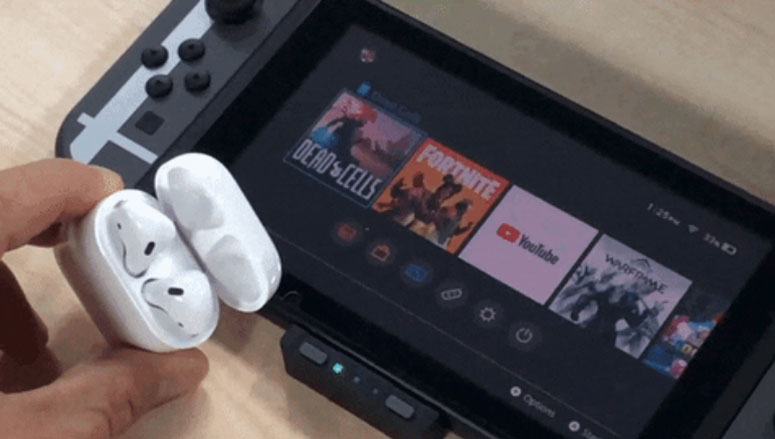
These methods are not the most official ones, but they work, nevertheless. First, we will answer the big question.
Can You connect AirPods to Nintendo Switch?
Technically, you cannot connect AirPods or AirPods Pro to Nintendo Switch, at least not directly. In fact, you cannot connect any Bluetooth-enabled audio system to Nintendo Switch directly. Instead, Nintendo wants you to use the 3.5mm headphone jack to listen to audio. While it is the standard, it is not the most convenient option out there. As a result, you could run into trouble while playing games, especially the ones involving dynamic movements.
So, the next question is this: how do you overcome this? Well, bright minds have already found easy methods to go around this problem. But, unfortunately, while some of them work seamlessly, others do not. Therefore, we have covered one of the best ways to connect an AirPods or AirPods Pro to your Nintendo Switch below.
How to Connect Your AirPods to Nintendo Switch?
We have already explained that Nintendo Switch does not support Bluetooth headphones. So, we need an intermediary to stand between the Nintendo Switch and your AirPods or AirPods Pro. You can find several ways to do this, but we recommend going for the HomeSpot USB-C Transmitter.
What Is It?
The HomeSpot USB C Transmitter is a nifty gadget that lets you connect Bluetooth audio devices to Nintendo Switch. However, it is a little different from the generic Bluetooth transmitters you can find. First of all, it has been tailor-made for Nintendo Switch. So, the design is super snug-fit, and you do not have to worry about loss of comfort. The best part?
You can keep the transmitter connected when you have docked the Switch or when the Switch is in handheld mode. More importantly, it comes with support for Qualcomm aptX, which comes in handy while connecting aptX-enabled headphones. The device can even stream to two headphones at once. You can even use the indicators on the device to know the streaming codec it uses.
HomeSpot also makes a Pro version if you want more features like smartphone audio mixing, streaming support, and an audio equalizer.
How to Use It?
Using the HomeSpot USB C Transmitter to connect your Nintendo Switch to an AirPods or AirPods Pro is easy than you think. You have to follow the steps we have listed below.
- You have to take the USB C Transmitter out of the box and connect it to the USB C port on Nintendo Switch. Please keep in mind that the device does not allow passthrough charging.
- Now, you can open the charging case of your AirPods or AirPods Pro. Next, press and hold the reset button on the back until you see a flashing white light on the front.
- Almost immediately, you have to press and hold the left button on the HomeSpot transmitter. You may have to keep the adaptor as close to the Switch for a few seconds.
- Once it is connected to your Nintendo Switch, the AirPods charging case will show a green light. You will now be able to listen to all audio from the Nintendo Switch.
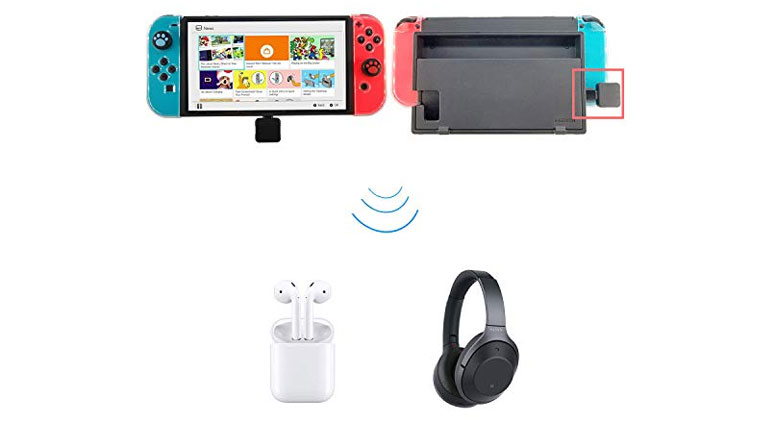
As we said earlier, the HomeSpot Transmitter is well-designed. So, even when you use the Nintendo Switch in TV mode, you can enjoy wireless audio with ease. In this case, you need to use the USB C to USB A adaptor included in the package. Then, you can connect the transmitter to the USB A port on your Nintendo Switch.
You can follow the same procedure for connecting any other pair of Bluetooth earphones. If these devices have aptX and aptX Low Latency mode, you can get an even better listening experience. You may find aptX support on many headphones and earphones now. But, as you can guess, AirPods or AirPods Pro does not have it.
Some Things to Note
Here are some helpful tips.
- The HomeSpot USB C Transmitter we have used does not require charging. So, you can use the system as long as your AirPods or AirPods have juice. So, if you have a pair of wireless earphones that offer extended battery life, you are good to go. It will be a great setup for road trips and long-haul flights.
- The standard version allows you to engage in in-game voice chat, thanks to its built-in microphone. However, if you need to use voice chat on WhatsApp or Discord, you will need the Pro one. The standard version does not have premium features like smartphone audio mixing, either.
- The transmitter does not come with volume controls. However, it should not be a problem because you can adjust the volume using the Nintendo Switch buttons. If you want to toggle the microphone, you can use the headphone buttons. The transmitter will indicate everything via LED patterns.
You can find all the information from the included documentation as well.
Also Read:
- 10 Best Nintendo 3DS Emulator for Android and PC
- Reverse Video Search: How to Search on Google Using Image or Video File
The Bottom Line
So, we recommend spending a little high on a Nintendo Switch-exclusive product than getting a random BT transmitter. In the end, you expect the best listening experience from the Switch-AirPods combo, right? We hope this guide helps.