For many people born in the late 1990s, Nintendo 3DS was more than a handheld gaming console. It was a magic device that introduced them to an amazing collection of games, including the classic ones seen on the previous-generation devices. As of September 2020, however, Nintendo has discontinued the production of the same.

Even before that, buying one of the Nintendo 3DS units was a challenging task, indeed. Of course, you can get something on eBay, but there is no surety on whether they will work. Luckily, you have the second option of using a Nintendo 3DS emulator. Conveniently enough, these simulator apps are available for Android and PC devices.
In this guide, we have covered everything you should know about Nintendo 3DS simulators and how you can use one of these apps on your Android smartphone or PC to play the games you used to play on a Nintendo 3DS.
Read More:
- 3 Best Ways to Run/Play Android Apps or Games on Your Windows Based computer
- 10 Beautiful Windows 10 Icon Packs
- 8 Best Android Apps to Scan Documents from your Mobile (Free and Paid)
What Is A Nintendo 3DS Emulator?
A Nintendo 3DS Emulator is a piece of software that can create and run a virtual copy of the Nintendo 3DS system within your Android smartphone or PC. It means you can do possibly everything you used to do using a Nintendo 3DS console without needing the console as such. We should keep in mind that Nintendo made the 3DS console during the first few years of the twenty-first century. Therefore, as long as you have a decent PC or a typical Android smartphone, you can run these simulator apps at full speeds. You can even download the games/apps you need to play your favorite games using the simulator.

Now that you know what a Nintendo 3DS emulator is, shall we see the best options you have in the market? We have chosen free and premium emulator apps for Android and Windows. Depending on the features and control you need, you can select any of the mentioned apps.
Best Nintendo 3DS Emulators for Android
You should check out the following apps on Google Play Store if you want to play Nintendo 3DS games using your Android smartphone. Because these apps are designed for a small screen, you can retain the Nintendo 3DS experience by mapping intuitive controls and impressive graphics. Considering how beefed up today’s Android devices are, there will be enough system resources as well.
#1 Free DS Emulator
If you want to play Nintendo 3DS games on your Android without paying, you should check out the Free DS Emulator app. This app works with popular Nintendo 3DS games and you can use a variety of file formats as well. You also have access to the standard features like Save game states and load game states. The app also provides a simple interface to map and adjust the buttons as you like. You can also connect an external game controller if you want.

If you have a good collection of Nintendo 3DS ROMs, you can have a good experience with this emulator. Its developers do an amazing job of maintaining the app with regular updates. When it comes to the problems, there are a few in the Free DS Emulator package. For instance, when you use certain cheat codes, the app may crash. More so, the ads can be annoying sometimes.
Free DS Emulator is available for free from Play Store.
#2 RetroArch
Another free emulator app for Android, RetroArch is another solution to play Nintendo 3DS games on your Android smartphone. Compared to other applications on this list, RetroArch does not restrict the user when it comes to content. It means you can use the emulator to run an immense variety of applications, without the worries of DRM or push ads. It is also worth noting that the RetroArch app does not have any ads, which is convenient.
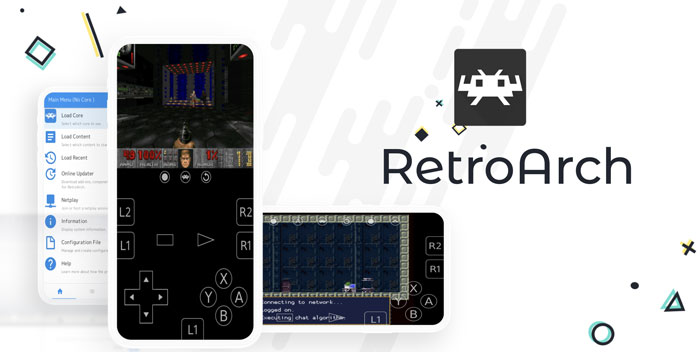
There are some impressive features to choose from in the RetroArch package, though. For instance, you can download programs online and map the controls as you wish. You can even use the NetPlay protocol to play multiplayer titles on the Nintendo 3DS emulator. You also get a variety of import and upload features that you can use.
RetroArch is completely free to use and available from Play Store.
Now that you have seen the best Nintendo 3DS emulators for Android, shall we look at the Android options?
#3 R4 3DS Emulator
R4 3DS Emulator is another popular choice for running Nintendo 3DS games within your Windows PC. It has been developed to provide a streamlined Nintendo 3DS emulation experience on your computer. However, we should warn you that the program is a little old and that you may come across some compatibility issues. On the bright side, the entire process is a piece of cake.

You can download the emulator setup file from the official website and follow the on-screen instructions. In just a few seconds, you can finish the installation procedure. There are other advantages too. For instance, R4 3DS Emulator can handle a wider variety of DS ROMs that other emulators may struggle with. You simply have to select the ROM file from your system storage.
#4 NO$GBA
There are times when you need a pretty powerful emulator to run Nintendo 3DS and DS games, right? You should then consider what NO$GBA has to offer. This emulator has been popular among experts for quite a while now. The best part? It is still available for free and you have an amazing community to depend upon. I mean, even if you run into trouble while using the NO$GBA emulator for Nintendo 3DS, a lot of resources can help you solve the problem.

But, as we said, you can use the NO$GBA emulator to run games made for other portable consoles as well. Compared to other tools we have listed so far, this emulator has an impressive User Interface as well. People use this emulator to play popular titles like Popular Diamond Version and Dragon Quest, taking them back to the old times. It is also completely free to use.
Some Other Emulators You Can Consider
While we have mentioned all the best Nintendo 3DS emulator tools for Android PC, here are some worthy mentions. The problem here is that most of these tools were designed for old machines and rarely get any update. However, if you have one of those old devices at home, running Windows 7 or Windows XP, you can check out these options.
- DeSmuME is another popular Nintendo DS emulator you can check. The app received the last update in 2015, and you may have some issues running the same on Windows 10. It is also worth noting that DeSmuME requires some kind of knowledge to run it smoothly. If you have a compatible system, the emulator can run with all the features. For instance, you can use your keyboard and mouse for typical control, to start with.
- 3DMOO is another emulator you can use with confidence. This app is also well optimized for the past versions of Windows. However, with some workaround, you can use the emulator to run all the 3DS games you want. It has been a couple of years since 3DMOO saw the update, but that is okay if you ask us. People have had success some of the legendary Nintendo 3DS games using this emulator for Microsoft Windows.
- iDeaS Emulator is another option you can consider when you want to play Nintendo 3DS games on your Windows computer. This emulator is easy to use and comes with all the controls you need while playing the game. Compared to the other options we have recommended, iDeaS Emulator has a truly intuitive Control Panel that makes navigation easier than ever.
As we said, many of these emulators are very old but they do the job pretty well. You can count them on if you want to try some of the archaic titles, you know. The problem with modern emulators is that they might have some trouble running very old titles. With old emulators, you do not have that issue.
The Bottom Line
We are sure you could find at least one working Nintendo 3DS emulator that suits your needs. That was why we included such a variety of options in the first place. We understand that most people would go for 3DS-emulator apps on Android since they are very stable and receives updates.
Depending on your needs, you will have to make a choice. Do you think we missed any great Nintendo 3DS emulator on this list? Do let us know via comments.
Cite this page
Thakur, T. (2024, April 13). 7 Best Nintendo 3DS Emulator for Android and PC. XtendedView. https://xtendedview.com/best-nintendo-3ds-emulator/
Thakur, Tushar. “7 Best Nintendo 3DS Emulator for Android and PC.” XtendedView, 13 Apr. 2024, https://xtendedview.com/best-nintendo-3ds-emulator/.
Thakur, Tushar. “7 Best Nintendo 3DS Emulator for Android and PC.” XtendedView, April 13, 2024. https://xtendedview.com/best-nintendo-3ds-emulator/.
Source: <a href="https://xtendedview.com/best-nintendo-3ds-emulator/">7 Best Nintendo 3DS Emulator for Android and PC</a>, XtendedView