



Customizability has been and still is the reason why thousands of users prefer Android to iOS. You often get a feeling that you are using an OS that has been designed for you. Or, at least, you have somewhat control over how it looks and behaves. Now, if you don’t want to go to the depths of rooting and stuff, font change is where you can start.

Changing the font of your Android device would also change how it looks, you know. Unlike what most of us think, there are a few great apps when you want to change the font in Android. Today, in this article, we will be talking about the 3 best font changer apps for Android with root and without root. Most of them work without root and offer a hassle-free experience.
#1 iFont
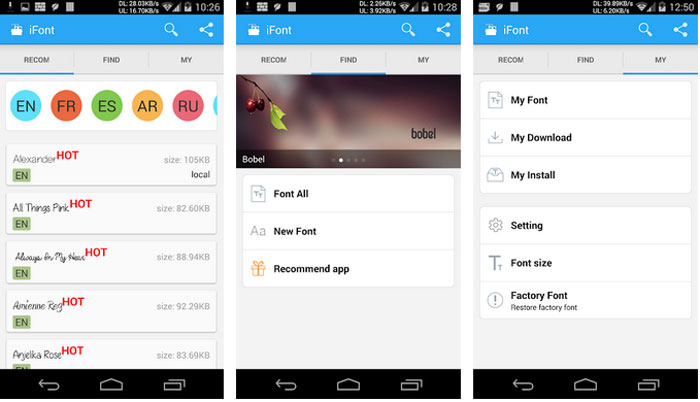
iFont for Android has been one of the most popular choices for changing font in Android. It works on some devices without root, but devices from companies like HTC, Sony and Motorola need to be rooted before it can be figured out. Overall, the usability of iFont is impressive enough. You can actually pick one font from the wide range of collection. There are also a few other features we loved, such as the easy options to back up and restore fonts. When you want to go back to the default-set font, it’s a matter of a few clicks. In short, if you want to get started on font customization, iFont is the best choice.
#2 HiFont
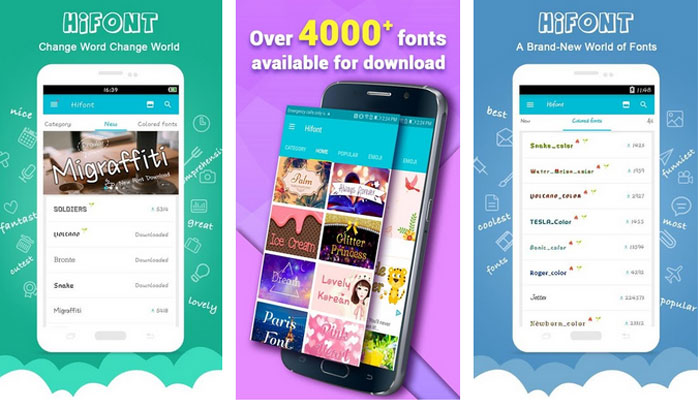
Are you looking for a font changer app that offers advanced features? In that case, HiFont is one of the best options you can find on Play Store. Just like we saw in the previous case, compatibility is a bit complicated. While it allows you to change fonts on Samsung and Huawei devices with ease, changing fonts on a Motorola or HTC would require rooting. Suppose you have already rooted the device and are planning to get started with customization: in that case, HiFont would give you sufficient options and control over how text is being displayed on your device.
#3 Stylish Fonts
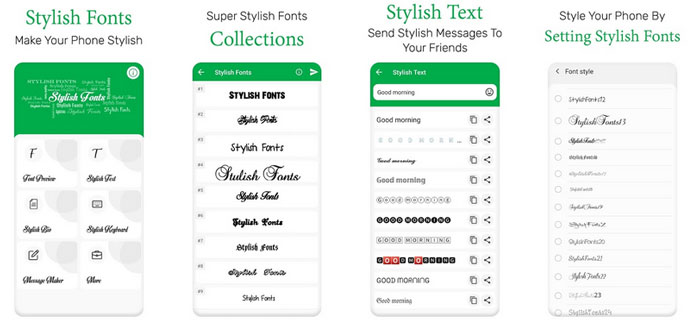
In case you are looking for some variety fonts on your device, you should consider getting Stylish Fonts for your Android device. The settings and set-up process are almost similar to the other apps, but we would say that the usability part is a bit more impressive. You would not have trouble in installing the app or changing the font for the first type. We should warn you, however, that the collection of fonts pertains to a particular genre. Not everyone may find the right font in the collection. Well, then, the whole point of customization is to find something that works out for you, right?
A Word About Changing Fonts on Android
We have seen some amazing font changer apps for Android, but there is something else you should be aware about, before proceeding.
Some devices have an in-built utility to change fonts. For instance, OnePlus devices have an option to change the font from the menu. Obviously, the number of fonts would be less. Unlike OnePlus, some device makers allow an option to bring in custom fonts as well. These in-built methods would be way better than installing a third-party app like the ones we’ve talked about above.
If you have some devices from Samsung or HTC, you may have heard of something called FlipFont. Basically, it’s a program that allows you to install third-party fonts and bring in customization without having to root the device. The take here is that you should check if your device already supports something like FlipFont. In that case too, you won’t need anything third party.
Also Read:
The Bottom Line
So, you have seen the three best font changer apps for Android, along with a few other methods. Depending on whether you have a rooted device and whether you want to root the device at all, you can make the final decision. By the way, if you know any other font changer apps for Android, do let us know via comments.
Cite this page
Thakur, T. (2024, March 22). Best Font Changer Apps For Android With Root & Without Root. XtendedView. https://xtendedview.com/best-font-changer-apps-for-android/
Thakur, Tushar. “Best Font Changer Apps For Android With Root & Without Root.” XtendedView, 22 Mar. 2024, https://xtendedview.com/best-font-changer-apps-for-android/.
Thakur, Tushar. “Best Font Changer Apps For Android With Root & Without Root.” XtendedView, March 22, 2024. https://xtendedview.com/best-font-changer-apps-for-android/.
Source: <a href="https://xtendedview.com/best-font-changer-apps-for-android/">Best Font Changer Apps For Android With Root & Without Root</a>, XtendedView


9 reader comments closed March 22, 2025
My phone is non-rooted. Can I change icons and fonts on my mobile?
It depends on your OS Vistor. Some phone offers customization features without any root. Can you tell me which phone you are using?
Nice list. I wanted to root my phone first to try these settings of fonts. But it seems like I can do it without even rooting the process. Isn’t it?
Yes, you can do that without rooting. Unrooted have some kind of limitations.
My Samsung mobile has a default option of changing the fonts. Why to use these apps? I don’t get it.
I see Mark. Few mobiles have the option of changing fots. But with these apps, you can do much more level of customization.
Can I change my SMS and WhatsApp font with these tweaks?
Yes, you can do that Arlene.
Good collection of font-changing apps for Android devices. Looking forward to using these apps on my devices and share this amazing information with my friend. Keep up the good work guys.
This thread is closed to new comments.