

Unlike the old days, not many laptops ship with an Optical Drive, commonly known as DVD/CD Drive. We’d not have the liberty to blame the manufacturers, either. It’s just once in a blue moon that we even think of CDs nowadays. They have become so obsolete that most of us have forgotten the golden age of Discs. That having said, even when almost everything has turned digital, there are times when you need to use a DVD / CD. But, how do you do that? Connecting an external CD drive isn’t really a practical option for most people. They are hard to find too.
The Need for ISO Mounting Software
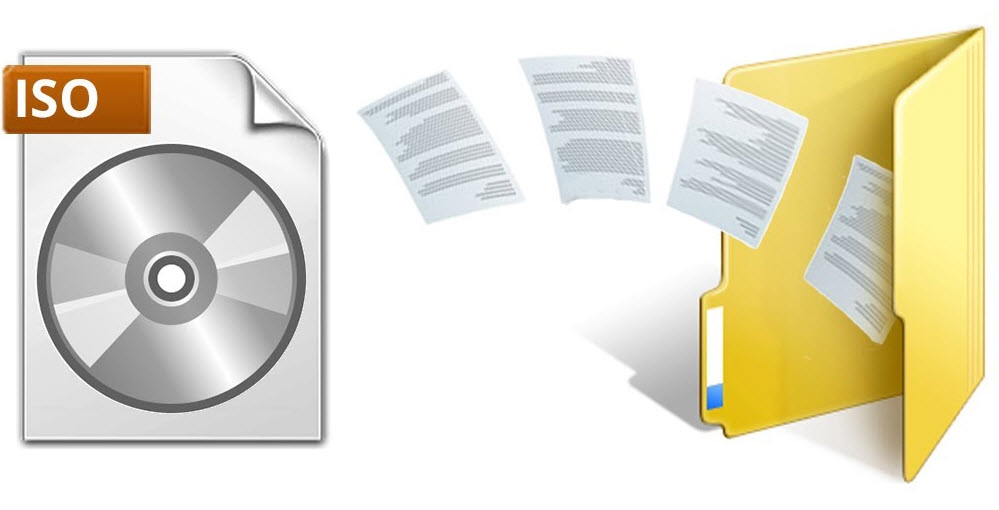
Well, this is where ISO Mounting Software comes to rescue you. This article is about the best ISO mounting software you can get for a Windows 10 device. Before that, you should know how it works. For those who do not know, ISO is a file format that you can use for storing content from CDs and DVDs. Suppose you have the installation disc of Microsoft Windows 10. For easier management, you can convert the DVD into an ISO file and store it conveniently on the device. And, whenever required, you can simply burn the ISO file into a CD/DVD. We hope you got the idea till now.
However, in a situation when you don’t have a CD Drive, what would you do? In such a case, an ISO mounting software can help you mount the ISO file, as though you have inserted the disc. Windows OS will recognize the ISO file as a physical disc and you can work accordingly. This is helpful when it comes to installing Games, Software or Drivers from DVDs. When you are mounting the DVD via an ISO file, you can have better speed and performance as well. So, the one thing you need for all these is an ISO mounting software for Windows 10. In this article, we have made a list of the 8 best ISO mounting software you can get right now.
#1 WinCDEmu

One of the finest products for the purpose of ISO mounting, WinCDEmu is perhaps the most popular tool as well. It’s a completely free tool you can download and install on your Windows PC, without much hassle. As you run the program, all you can see is a small interface. The best part is that WinCDEmu integrates quite a lot well with the Windows option. You can easily access the program from your Windows explorer context menu. Coming to advanced features, WinCDEmu has support for not just ISO-based image files but also other few such as CUE and NRG. While mounting the disc, you can also assign the drive letter, in case required. In short, WinCDEmu is one of the most effective and impressive tools for ISO mounting.
#2 Gizmo Drive
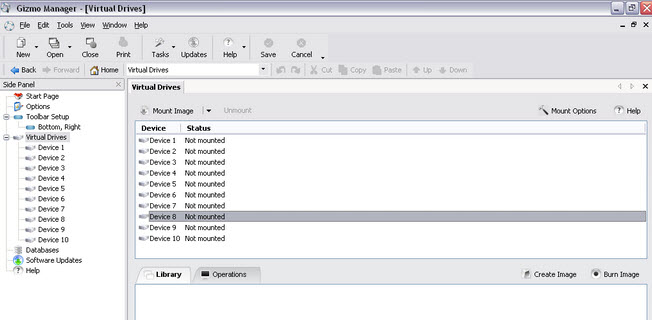
Gizmo Drive happens to be one of the popular tools in Gizmo Central package. This one, however, is meant to help you manage all aspects of virtual drives. It’s not a dedicated ISO mounting software, but you can do that with ease. However, when compared to the former software, Gizmo Drive may require some time for getting used to the interface. As far as image mounting is concerned, you can easily mount formats like ISO, NRG, CUE and BIN. You can also mount password-protected images and turn it into a virtual hard drive. As far as a geek is concerned, these features will be really useful for sure. Although it says it supports Windows 7 only, the software seemed to work fine in Windows 10 devices that we had tried.
#3 Virtual CloneDrive

Yet another option for mounting ISO and other types of CD image files, Virtual CloneDrive is quite popular & trusted among geeks. Be it normal CD, DVD or Blu-Ray ISOs, everything works via Virtual CloneDrive. It’s easy to set up, use and maintain. The best part is, if you want, you can have up to 8 virtual drives simultaneously. Adding into this its support for various Image files, including ISO and CCD, you can have the best experience of ISO mounting with this software. In case we didn’t mention, Virtual CloneDrive is completely free to use and you would not have to worry about complications. We’d say this is one of the commonest way to mount an ISO file, or any image file for that matter.
#4 DAEMON Tools Lite

Once again, we have a multipurpose program with different features for drive simulation. Even with these many features inside, it feels easy to use DAEMON Tools Lite for mounting an ISO file. As long as you’re using the program for personal/home purposes, it’s completely free. That having said, you have an option to select the premium version if you are looking for the extra features. However, unlike most of the programs we’ve covered, DAEMON Tools Lite can manage only up to 8 virtual drives, which is, by the way, enough for majority of people. The mounting is process is so effective and the system has no issues in detecting the drives just as they are mounted.
#5 DVDFab Virtual Drive

With DVDFab Virtual Drive, we end this list of the best ISO mounting software for Windows 10. As you would have guessed from the name, DVDFab Virtual Drive is supposed to create a virtual drive in your computer. It is available for all versions from Vista to 10, offering classic compatibility. DVDFab Virtual Drive is so powerful that it can emulate up to 18 DVDs or Blu-Ray drives at the same time, which is useful for ultimate geeks out there. There also are a bunch of settings you can adjust for the best performance. Despite all these features, you can download and use DVDFab Virtual Drive free of cost, which is a great advantage for sure. If compared to the other programs out there, it has a simpler UI and set-up process too.
Let’s Wrap Up
So, these are some of the finest pieces of software you can use for ISO mounting. While all the programs do have support for ISO-based image files, you can find multi-format support as well. And, all the tools are free to use, especially for personal purposes. In light of our experience, we can say that the tools are quite strong to manage all the drives at the same time. So, we hope you’ll have a great time in setting up and using virtual drives!
Cite this page
Thakur, T. (2024, March 23). 5 Best ISO Mounting Software For Windows 10. XtendedView. https://xtendedview.com/iso-mounting-software/
Thakur, Tushar. “5 Best ISO Mounting Software For Windows 10.” XtendedView, 23 Mar. 2024, https://xtendedview.com/iso-mounting-software/.
Thakur, Tushar. “5 Best ISO Mounting Software For Windows 10.” XtendedView, March 23, 2024. https://xtendedview.com/iso-mounting-software/.
Source: <a href="https://xtendedview.com/iso-mounting-software/">5 Best ISO Mounting Software For Windows 10</a>, XtendedView




11 reader comments closed March 23, 2025
Which one is the simplest iso mounting software?
I want only the simplest one. that supports one-click mounting.
Most of them are simple ones. You can try any one.
DVDFab is an excellent ISO mounting software for Windows indeed. But the complex procedures to create new virtual drives is what turns me OFF.
Thanks for the other interesting software programs. Loved it!
Can we install operating systems using these software programs? Like mounting the ISO file and then installing the OS on the other drives? Is it possible? Please enlighten me on this topic.
No OS installtion needs to work in non mounted mode. So you can’t do that.
Want to run MacOS DMG installation file. Can I do that? with these softwares? Or have to use the Unibeast on Mac only?
Can we use these apps for Creating a Bootable USB Drive?
Yes ofcourse.
What’s up to every , because I am genuinely keen of reading this weblog’s post to be updated
on a regular basis. It contains pleasant data.
Windows default offers an option to mount it isn’t it?
Yes, it does.
This thread is closed to new comments.