
Carrying an iPhone is still a status symbol although there are many expensive Android smartphones. Moreover, people want to make their phones look like iDevices. So, do you want to know how to get iPhone emojis for Android?
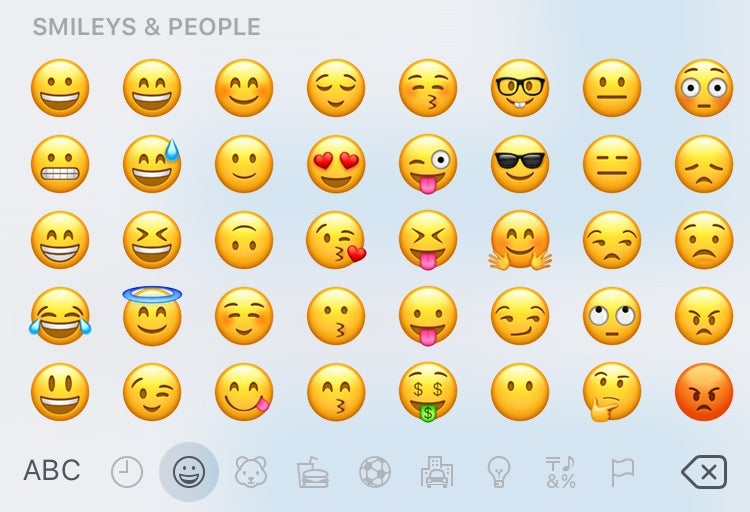
Here, we will give you separate methods for both rooted and non-rooted devices. We don’t recommend you go for rooting just for the sake of getting the iOS emoji. Opt for the non-rooted method.
How to Get iPhone Emojis for Android?
We are going to change the emojis on Android by installing a new font. So, the key aspect is selecting a font that has an iOS emoji style. Without further ado, let’s jump right into the meat of this post.
Also Read:-
- Codes to Check if a Phone is Hacked or Tapped (Android & iPhone)
- How to Fix iPhone Messages Keep Indexing and Attachments are not Showing
- How To Keep Your iPhone Safe From Spy And Protect Privacy
How to Change Emojis on Android without Root?
You might have tried many keyboards that claim to offer iOS emojis. What they do is display iPhone-style emojis on the keyboard and on actual typing, they stay the same. Here, you will get a full-on experience.
- First, you have to equip your phone with the capability to install third-party apps. For that, go to Settings. Search for Unknown Apps. Turn the toggle on
(On some phones, you may have to specify the app, from which you want to install third-party applications).
- Once you cover the first step, download Emoji Font 3 APK file (download link).
- Open the downloaded APK file to start the installation. Wait for a few moments to finish the process.
- As the installation completes, you need to change the font style. Go to Settings and search for Fonts (we are not giving you exact steps because they are different on different devices).
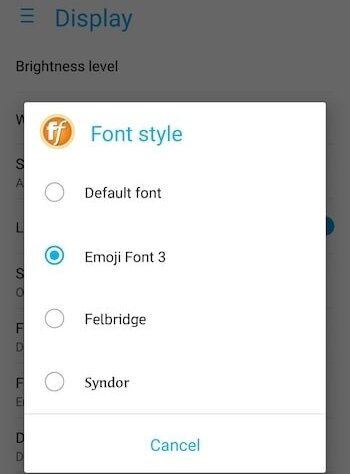
- You need to select Emoji Font 3 from the list of fonts there.
- Now, open Play Store and install Gboard. Without this keyboard, you won’t be able to see iPhone emojis on Android.
There you go! From this moment, you can send iOS-styled emojis. Nonetheless, the device on the receiving end decides how they see the emojis.
Caution:- On some devices, changing fonts is not possible. If you have such a device, you can’t do this. The root method is available for every device. However, as we already said, you must not go for root if you don’t know what you are doing.
How to Get iPhone Emojis for Android (with Root)?
Simply put, rooting is getting control over the file system and configuration of the Android platform. Once rooted, you can use this method on any device regardless of the manufacturer.
- Here, you have to download Emoji Switcher APK (download link).
- Install the app after turning on Unknown Sources.
- Open the app and grant root access (most phones get Super SU after rooting up. So, grating root access is not going to be an issue).
- On the main screen, you will see a drop-down menu that shows the name of your current emoji set. Tap on the same.
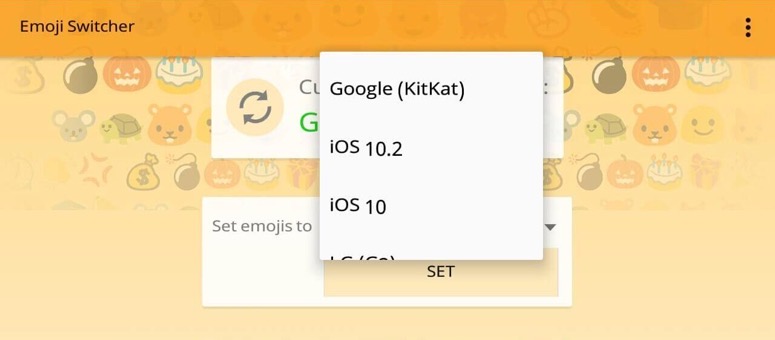
- As you can see in the image, Emoji Switcher has many options to choose from. You want to get iOS emojis on Android, don’t you? Hence, select iOS 10.3 (other versions are also available).
- The application will install a font that has the iOS emojis. You need to wait for a couple of minutes. Once it finishes, tap on Reboot.
Woo-hoo! Once the system reboots, you can see iPhone emojis. Nevertheless, the way how people see the emojis at the receiving end depends on their device (as we already said).
How to Get iOS Emojis on Android (with Root)?
We have already given you a method that utilises the root access. Here, you will get another method. If your phone isn’t rooted, this process is useless.
- We need Emoji Font 3 app here. So, go to the first method and grab the APK file from there.
- Turn on Unknown Sources and install the application.
- You need another app called iFont. It’s available for free on Play Store (link). Don’t hesitate to install the same.
- Open iFont after installation.
- From the top navigation, go to My.
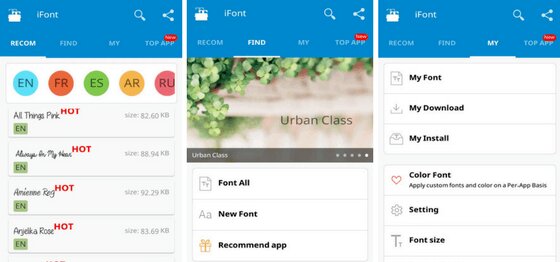
- Send your eyes towards the main content area. Tap on My Install.
- Select Emoji Font 3, choose the font size, and opt for English.
- Then, you will see a prompt seeking permission to change the font. Tap OK.
That’s all! After a reboot, you will start seeing Apple’s iPhone-like emojis on your Android device. Make sure you follow all the steps given above.
Frequently Asked Questions
The style of emojis are different on both iPhone and Android. Although you get the same emoji, the display style is different. So by default, it is not possible to see the exact iOS emojis on Android. However, with the help of third-party apps and root access, you can emulate the same style.
You won’t find an in-house app or setting to do this on Android. Hence, you need to seek the help of third-party apps. Emoji Font 3 is such an app. If your phone is rooted, you can also go for Emoji Switcher.
With each major Android update, Google make changes to the emojis. We haven’t seen an update exclusive for emojis so far. Still, you always have the choice to change Android emojis to iOS-styled with the help of external apps. With the root access, you can, without any limitation, alter the emoji theme.
As we have been saying multiple times, a direct method is unavailable. However, you can install Emoji Font 3 alongside Gboard to change the emoji style. You don’t even need root access for this.
Also Read:-
- 5 iOS Games that can make you addicted
- 10 Ways to Fix Steam Failed to Load Steamui.dll Error
- Best Google Chrome Extensions for Productivity
Conclusion
You now know how to get iPhone emojis for Android, don’t you? We have given you three methods. Do not attempt to root your device if you have no prior experience in the field. Do you know any other way to change emojis on Android? Be our guest and tell us about it in the comment section down below.
Cite this page
Thakur, T. (2023, January 31). How to Get iPhone Emojis for Android (Root & No Root)?. XtendedView. https://xtendedview.com/how-to-get-iphone-emojis-for-android/
Thakur, Tushar. “How to Get iPhone Emojis for Android (Root & No Root)?.” XtendedView, 31 Jan. 2023, https://xtendedview.com/how-to-get-iphone-emojis-for-android/.
Thakur, Tushar. “How to Get iPhone Emojis for Android (Root & No Root)?.” XtendedView, January 31, 2023. https://xtendedview.com/how-to-get-iphone-emojis-for-android/.
Source: <a href="https://xtendedview.com/how-to-get-iphone-emojis-for-android/">How to Get iPhone Emojis for Android (Root & No Root)?</a>, XtendedView