

WordPress and Google Adsense is now the most used combination to make money online. It is very easy to install the Google ads on WordPress powered site and also we can expect a good CTR on the pages. WordPress has a facility to preview the posts before publishing. This creates error of crawling for both Google search engine bot and Adsense page crawling bot.


What are Adsense Crawler and its errors?
Before going to discuss any types of error that are Google Adsense crawler generates we first look on what is Adsense crawler? Adsense crawler is very similar to Google, Yahoo, Bing search engine‘s BOT (Robot). It is a computer algorithm that continuously checks the pages of website on which Google ads are displaying.
What Google says?
“Our crawler regularly visits all pages on which Google ad code is displayed in order to determine the page content and deliver targeted ads. If our crawler encounters an error and can’t reach your page, we’ll report the error and suggest steps to fix it.”
You quit obviously ask why this BOT continuously visiting our page? The reason behind is that Google Adsense always display relevant ads to our page content. In other word they are known as contextual ads. For displaying such contextual ads on every page of your website Google Adsense needs to determine your page content continuously.
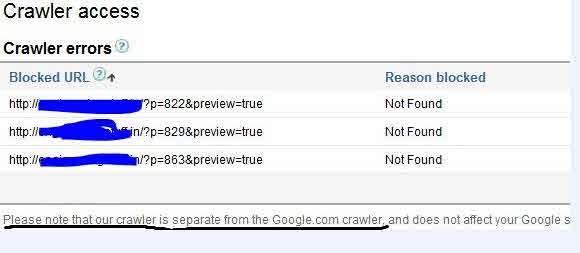
It is visible under account setting in Google Adsense Publisher dashboard.
Read that notice in the image that Adsense crawler is different than Google search engine crawler.
What is WordPress Preview post Page?
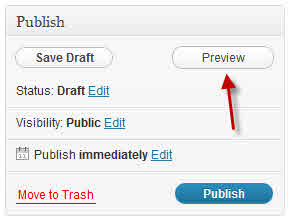
WordPress is best CMS and blogging platform that have being using by world. When we write any post inside the WordPress, there is an option to preview that post in our website before actually publishing it. The advantage is that we can detect and rectify the errors in the post very easily. When we preview any post see the image above to get idea about it.
Reasons behinds the generation of crawling errors:
Usually the crawling errors are generated for the following reasons:
· URL not found
· URL is unreachable due to hosting issues
· URL is blocked by robot.txt
· Some other reasons
The first one is most common reason behind it. That is page URL not found. When we preview any post inside WordPress it create a url that is temporary and it is valid only till post is unpublished. As soon as when we publish the post that URL gets destroyed. Hence when we publish the post that url is destroyed and crawler error created.
See image that WordPress URL structure for preview pages:

Method to Avoid the Adsense and Googlebot Crawling errors:
The simple way to avoid those errors and remove Adsense ads from your WordPress preview post pages is that to restrict Google Adsense BOT from preview pages. This can be done by editing the robots.txt file of the site. The robots.txt tells the BOTs about which pages to crawl and which to not.
Here is the method to add one line inside your robotx.txt file which will disallowed all bots to enter your WordPress preview page.
Add this line to robots.txt file:
Disallow: /?p=*</em>
So the total file will be look like this:
User-agent: *
Allow: /
Disallow: /cgi-bin/
Disallow: /wp-admin/
Disallow: /wp-content/
Disallow: /wp-includes/
Disallow: *?wptheme
Disallow: /?p=*
To edit your robotx.txt file, first download it to pc by FTP or cPanel and edit it with notepad and upload it again so that original one will be replaced.
You can see my robots.txt here: https://xtendedview.com/robots.txt
Important:
If you are not familiar with editing and uploading/downloading the robotx.txt file then you can use this free WordPress plugin: PC Robots.txt which allows you to edit it inside your WordPress dashboard very easily. I will recommend you the manual method because you should keep minimum number of WordPress plugins on your website.
Cite this page
Thakur, T. (2020, May 12). How to avoid and remove Adsense Crawler errors and Ads form WordPress post preview page. XtendedView. https://xtendedview.com/how-to-avoid-and-remove-adsense-crawler-errors-and-ads-form-wordpress-post-preview-page/
Thakur, Tushar. “How to avoid and remove Adsense Crawler errors and Ads form WordPress post preview page.” XtendedView, 12 May. 2020, https://xtendedview.com/how-to-avoid-and-remove-adsense-crawler-errors-and-ads-form-wordpress-post-preview-page/.
Thakur, Tushar. “How to avoid and remove Adsense Crawler errors and Ads form WordPress post preview page.” XtendedView, Last modified May 12, 2020. https://xtendedview.com/how-to-avoid-and-remove-adsense-crawler-errors-and-ads-form-wordpress-post-preview-page/.
Source: <a href="https://xtendedview.com/how-to-avoid-and-remove-adsense-crawler-errors-and-ads-form-wordpress-post-preview-page/">How to avoid and remove Adsense Crawler errors and Ads form WordPress post preview page</a>, XtendedView




10 reader comments commenting closed
I wonder if disallowing anything with ?p=* can cause troubles with those whose WordPress permalinks (post urls) are configured with default “domainname.com/?p=xyz” (where xyz is the post number automatically assigned by WordPress)?
My permalinks are different nowadays, but they were initially set like that by WordPress so I wonder whether there’s many blogs with this setup that could be affected. In that case wouldn’t this line in robots file block AdSense from virtually all the posts? Would it be more specific and less risky to look for and disallow “preview=true” instead and what would be the syntax for that?
You are right but that “domainname.com/?p=xyz” but that permalink structure is not recommended for SEO point of view. and about your second point “preview=true” is great idea for it I never tried that anyway I think the format should be like this disallow *preview=true* .
Anyways thanx for sharing your knowledge here. I will try and tell you the result. 🙂
Agreed on not recommended permalinks.
Regarding the disallow statement, I already searched Google’s recommended syntax and set up my robots.txt to use:
Disallow: /*preview=true$
We’ll see how it works – I even put a post about it on my blog. Thanks for sharing ideas – your post showed me the way to this.
Don’t do this. Don’t use robots.txt to block previews or Google will index all of your preview pages with a “this page is blocked in robots.txt” description. Instead just use a conditional tag around your wordpress units.
No, I am using it since 1 year and it only avoid the adsense to display ads on the WordPress post preview page, not on actual WordPress page.
brillant piece of information, I had come to know about your web-page from my friend hardkik, chennai,i have read atleast 9 posts of yours by now, and let me tell you, your webpage gives the best and the most interesting information. This is just the kind of information that i had been looking for, i’m already your rss reader now and i would regularly watch out for the new posts, once again hats off to you! Thanx a million once again, Regards,
Hi Tushar,
Hats off bro. I was fed up with this problem for over a month and this is the best explanation I have got till now. Thanks a lot buddy.
And I’m having problems from other than preview pages. Like some URL’s which we accidentally type which are not valid. I’m really fed up but I think I can solve the preview shit again.
Thanks again bro! 🙂
Why is Google even looking at the preview pages in the first place? You’d think they’d have built something into their algo to avoid this, seeing as how WP is (one of) the largest blog CMS systems around.
Hi Tushar,
Recently I have faced same issue on my Adsense account. Thank you for providing details and solution for this error, but why you have used [php] [/php] for robots.txt file? I have never seen robots file like this. Thanks
Thanks for bringing that into our attention. It was WordPress formatting error. I have corrected that now.
This thread is closed to new comments.