
Released in 2022, Elden Ring rose to fame within no time. You can install the game on Xbox, PlayStation, and on PC. However, many reported that Elden Ring controller not working on PC.

In this article, we are going to dig deep into the issue and suggest you a few solutions. Before you get that, we will walk you through the possible causes.
How to Fix Elden Ring Controller not Working on PC Issue?
When you encounter this issue, restart your computer. Are you still facing the same problem? Try updating the operating system. And then, enable controller support on Steam. We will elaborate on all these solutions and a few more below.
Also Read:-
- The Top 8 DJ Controllers for Beginners
- 4 Ways: How to Run Android Apps and Games in Windows 10 | 8
- 5 Online Games are Easy to Teach to Anyone
- 5 Best Offline Solitaire Games
Elden Ring Controller not Working Xbox, PS3, PS4 & PC; Causes
An outdated operating system or GPU driver is the main culprit. You have to ensure they both are up-to-date.
Another possible reason is the disabled controller support on Steam. If you have downloaded the game via Steam, you need to enable controller support there. Moreover, Steam Overlay sometimes prevent the game from working with controllers.
One of the common reasons behind this error is corrupted game files. Similar to any software, when the necessary files go corrupt, it’s impossible to run.
Elden Ring Controller not Working on PC; Solutions
In this section, we are going to give you the potential solutions. The first solution is the simplest, and as you go down, the fixes may require some steps. Start from the top and slowly move towards the bottom.
Restart the Computer
As we always say, some problems may seem complicated, but their solutions may be the simplest. So first, you have to reboot your system. Once the system restarts, launch Elden Ring to see if the controller works.
Update GPU Drivers
Graphic Processing Unit aka GPU is an integral part of a system when it comes to playing graphic-intensive titles. How do you update the GPU driver on Windows?
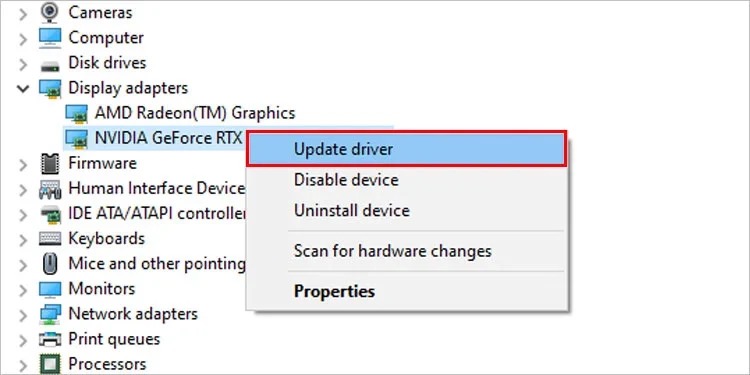
- Press the Win key or click on the Start button and then, search for the device manager.
- From the results, open Device Manager.
- Go to Display Adapters and select your GPU.
- Right-click on your GPU name and opt for Update driver.
- A new window will pop up. From the two main options, you have to go with Search automatically for drivers.
- The operating system will install the driver if an official one is available on the web.
Don’t forget to restart your computer once the installation finishes.
Update Windows
It’s perennial that you keep your operating system up-to-date. Apart from the Elden Ring not controller not working issue, you may run into serious security troubles. So, we are going to make sure Windows is up-to-date.
Enter check for updates into the start menu. You will get a system setting with the same name as the result. Click on the same. The Check for updates button is present there. On clicking that, you will see if there’s a pending update to install.
Don’t forget to install it if there’s anything pending. The Windows may reboot once or twice to finish the installation.
Disconnect Keyboard and Mouse
As absurd as it sounds, keeping the keyboard and mouse connected while you try to play with a controller is causing issues for many users. So, you need to disconnect the keyboard and mouse for some time. Does the controller work?
Enable Controller Support on Steam
Have you downloaded Elden Ring using Steam? Then, we recommend you follow the steps given below to enable controller support.
- Right-click on the Steam shortcut (on the desktop or from the start menu) and go for Run as administrator.
- On the UAC prompt that pops up, select Yes.
- Click on the Big Picture Mode button (two arrowheads in a single square) at the top-right.
- Go to Settings>> Controller settings.
- You will see multiple controller options there. Based on what you use enable the checkbox. We suggest you turn on the Generic Gamepad Configuration Support as well despite the one you use (for example, if you have an Xbox controller, activate Xbox Configuration Support and Generic Gamepad Configuration Support).
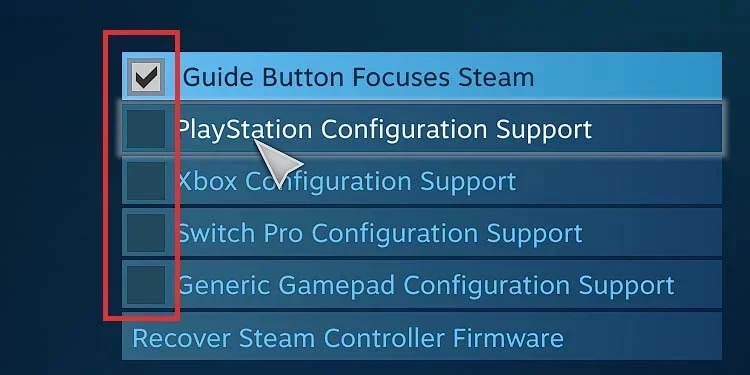
Steam will download and install the required drivers. If that doesn’t fix the issue, we recommend you follow the next solution (it’s an add-on to the previous one).
Disable Steam Input Per-Game Setting
Even after turning on the controller support on Steam, you may not get it to work. Chances are Input Per-Game Setting may be stopping the controller. We are going to disable this option.
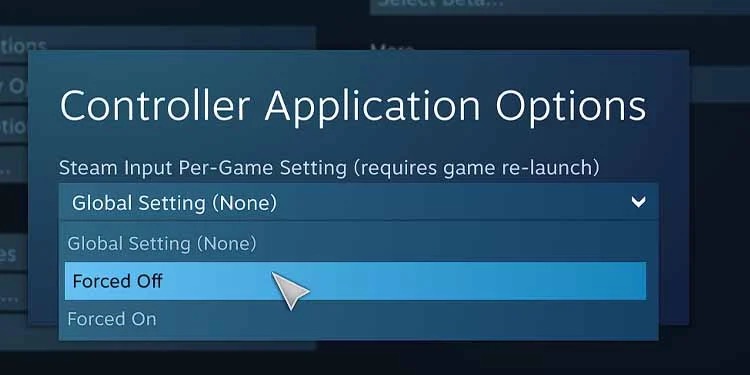
- Follow the first three steps from the previous solution.
- Go to Library and select Installed from the left pane.
- Opt for Elden Ring and then follow Manage Game Options>> Control Options.
- Click on Steam Input Per-Game Setting and choose Forced Off.
- Don’t forget to save the changes by pressing Ok.
There you go!
Disconnect All Bluetooth Devices
For many users, Bluetooth devices have a problem with controllers on Elden Ring. Instead of disconnecting the devices one by one, you should just turn Bluetooth altogether.
Just open Settings (Ctrl+ I), go to Bluetooth and disable the toggle. That’s it.
Uninstall vJoy Software
You don’t need vJoy if you have a physical controller. Simply put, vJoy is a virtual joystick tool, which might hinder the way a physical one works.
Don’t hesitate to uninstall this piece of software. You should go to Control Panel>> Programs and features. Then, select vJoy.
Disable Steam Overlay
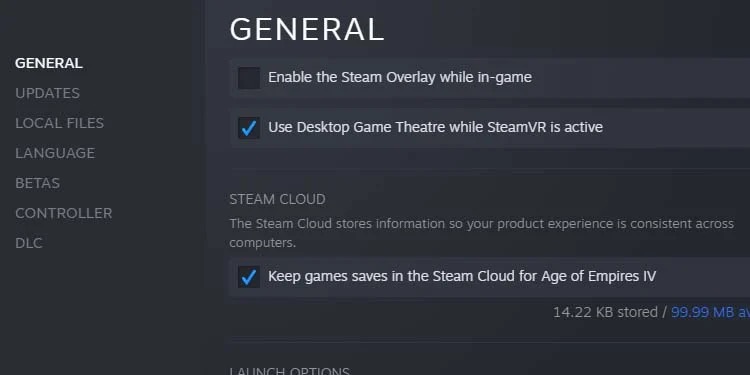
We have already told you that Steam overlay contradicts with controllers. Hence, we should turn it off to see if the issue goes away.
- Open Steam and go to Library.
- You will see all your titles there. Right-click on Elden Ring. Then, select Properties.
- Opt for General.
- You will see a checkbox with the label, Enable Steam Overlay while in-game. Make sure you have it disabled.
Are you still here? You couldn’t surpass Elden Ring controller not working on PC problem? We have another solution.
Fix the Corrupted Files
File corruption can happen at any time. When you accidentally delete a mandatory file, you can do nothing but watch the game crash again and again. Wait! We have an option on Steam to fix such issues.
- On Steam, open Library.
- Go to Properties of Elden Ring (you can see the option by right-clicking on the title).
- Select Local Files.
- On the next window, click on Verify Integrity of game files button.
The program will take a few minutes to check the files. It will fix the issues if any corrupted files are detected.
Frequently Asked Questions
You should first restart the computer. Then, make sure the OS and the driver are up-to-date. If all that’s done, go with the other solutions like fixing the corrupted files, disabling Steam overlay, and more.
You can make Elden Ring show controller inputs by following Settings>> Sound and Display>> Device for On-Screen Prompts.
That means, the issue is with the game not in Steam. Try verifying the integrity of game files.
Also Read:-
- The Best Racing Games For Mobile Devices
- The Best of the Best Video Games of All Time
- Reverse Video Search: How to Search on Google Using Image or Video File
Conclusion
We hope you fixed Elden Ring controller not working on PC issue. Which solution did help you? Is there any workaround we haven’t mentioned in this article? Don’t hesitate to share your experience with us in the comment section below.
Cite this page
Thakur, T. (2023, February 9). Elden Ring Controller not Working on PC (Fix Easily). XtendedView. https://xtendedview.com/elden-ring-controller-not-working/
Thakur, Tushar. “Elden Ring Controller not Working on PC (Fix Easily).” XtendedView, 9 Feb. 2023, https://xtendedview.com/elden-ring-controller-not-working/.
Thakur, Tushar. “Elden Ring Controller not Working on PC (Fix Easily).” XtendedView, February 9, 2023. https://xtendedview.com/elden-ring-controller-not-working/.
Source: <a href="https://xtendedview.com/elden-ring-controller-not-working/">Elden Ring Controller not Working on PC (Fix Easily)</a>, XtendedView