

Roku is a movie lover’s paradise. Of course, it is a one-stop place to stream content online. Nevertheless, that doesn’t mean it’s perfect. You come across issues like Roku TV volume too low.
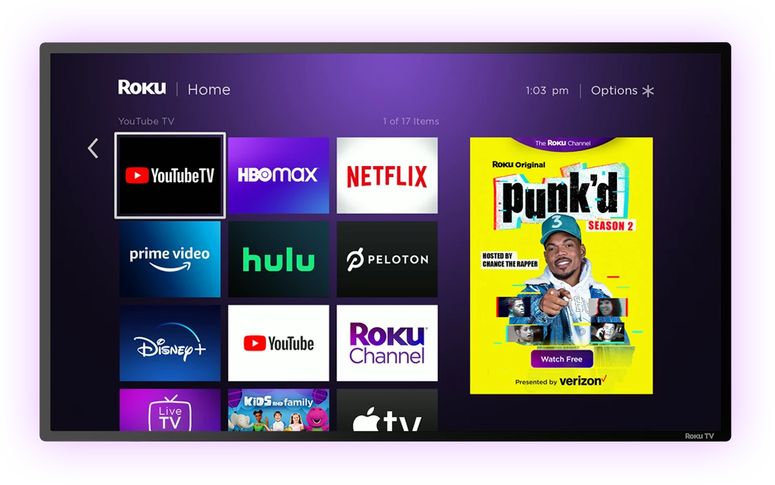
The reason can range from a faulty remote to an ineffective speaker. As is the case with any technical glitch, it’s impossible to pinpoint a single cause. We will try out different solutions to stick to the one that works for you.
How to Fix Roku TV Volume Too Low Problem?
In the following sections, you will deal with all the possible reasons that are going to hinder Roku from giving its maximum volume. We will examine the remote, the speakers, and a few more.
Also Read:-
- Top 5 GOM Player Alternatives for Windows
- Fix: Hulu keeps logging me out! [8 Solutions]
- Best Voice Activated Remotes for your Cable TV
- How to Set up a 24/7 Live Stream TV
Solution 1: Check the Remote
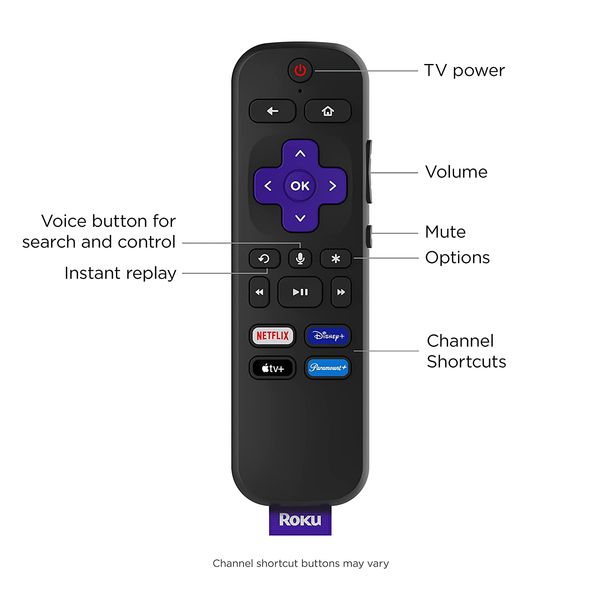
Are your attempts to increase the volume going futile? Have you considered the fact that there is no battery juice left? So, open up the back compartment and replace the batteries.
We all overlook simple solutions like battery replacement. Try changing the batteries and pressing the volume up button. You won’t possibly check the next solution.
Solution 2: Unpair and Re-pair the Remote
Is your Roky volume too low? Did replacing the batteries not help? Well, we are going to unpair the remote with the device and pair it once again.
- First, you have to remove the batteries from the remote. As you have gone through the first solution, we hope you know how to do that.
- Now unplug Roku TV from the wall socket. Wait a couple of minutes before you plug it back in.
- You need to insert the batteries into the remote to start the re-pair process.
- Press the pair button and hold it for 10 seconds.
- You will see an LED light flashing. Once you see that, go to Roku for finishing the pairing procedure.
There you go! You can check whether or not all the buttons on the remote (especially the volume rockers) are working.
Solution 3: Fiddle with Roku TV Audio Volume Modes
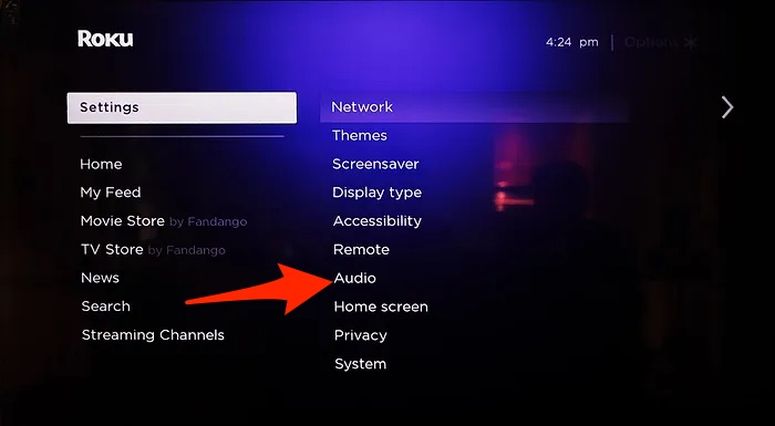
Roku TV has many audio modes available. Fiddling with those may result in an unpleasant sound experience. Below are a few of the modes (you may not find some on the old models).
- Sonic Emotion™ Premium.
- DTS® TruSurround.
- Dolby® Audio Processing.
- Roku Smart Soundbar Connectivity.
- No Sound Settings.
- DTS® Studio Sound.
- Volume Mode
- Night Mode.
- Dialogue Enhancer.
- Speech Clarity.
- Dolby AC-4 Dialog Enhancement.
Don’t you know how to access these modes? Press the home button on the remote and go to Settings>> Audio>> Volume modes. You can select the mode you want from there.
Solution 4: Disable Automatic Volume Leveling
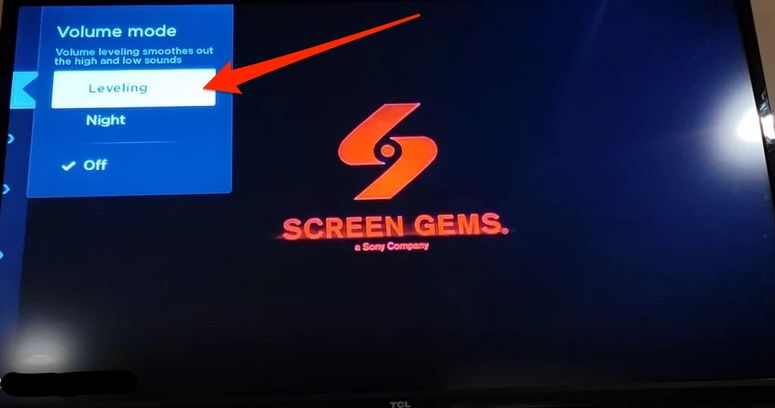
We are used to startling volume bursts in movies. To avoid that, Roku has an audio mode named Automatic Volume Leveling. On the contrary, this may significantly impact the audio level.
How do you disable the setting?
- Press the Home button on the remote.
- Now go to Settings>> Audio>> Volume modes.
- Deactivate Leveling.
That’s it. Roku automatic volume adjustment not enabled is a perfect condition to overcome the low sound level issue.
Caution:- If you see the option is already turned off, try enabling it and then play a movie for a couple of minutes. Sometimes, this option equalises the volumes of both music and dialogues, which may result in an overall increase in the sound level.
Solution 5: Check the Built-in Speakers
Every electronic device is susceptible to hardware damage. Roku TV is no exception. As the gadget ages, chances are high for the speakers to undergo the usual wear and tear.
You can contact the official customer care to seek support. In case your Roku TV is out of warranty, you can get help from an expert. When you opt for an external speaker, make sure you get a Bluetooth dongle and the app ready because Roku works only with their external speakers out of the box.
Solution 6: Reset Audio Settings on Your Roku TV
Fiddling with different audio modes to finally stick to one can be tiring for many. If you set out for a hard reset, it will delete all the data you have on the Roku TV. Don’t worry, there is a reset audio settings option.
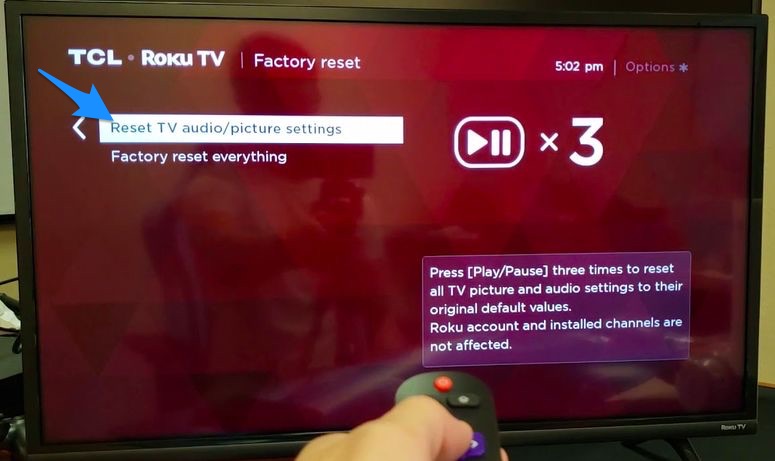
- Open Settings>> System>> Advanced System Settings on your Roku TV.
- Select Factory Reset.
- Go with Reset TV Audio/ Picture Settings.
By following the steps given above, you can avoid the hard reset, and still bring the audio settings to the default ones.
Caution:- Not all Roku devices have this option. That means you have no other choice than to go for a complete hard reset if the other solutions mentioned here don’t work.
Solution 7: Do a System Restart
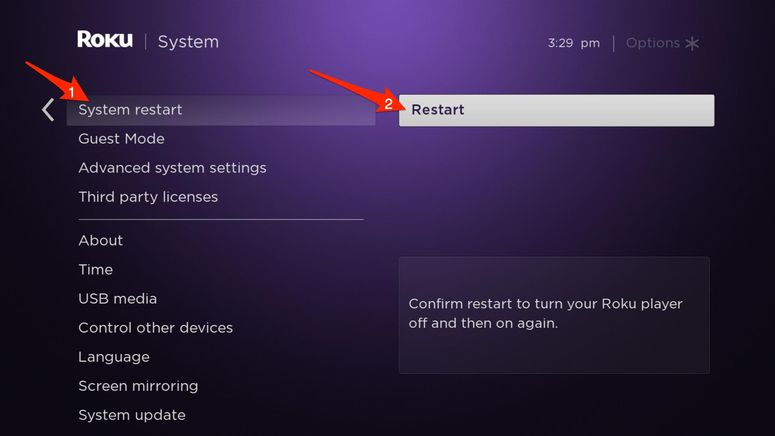
When you experience a Roku TV volume too low issue, doing a system restart will fix the issue, albeit for a short time. How do you restart the system?
- Press the home button on the remote.
- Go to Settings>> System.
- Scroll down a bit to see the Power option.
- Can you see System Restart there? Press the same.
- Hit Ok.
Start playing a movie now. Chances are slim for you to experience the low volume problem now.
Solution 8: Hard Reset Your Roku TV
Is Netflix volume low on Roku TV? Or are you experiencing the same issue on any other streaming platform? Irrespective of the app you are getting this issue on, a hard reset will probably fix everything.
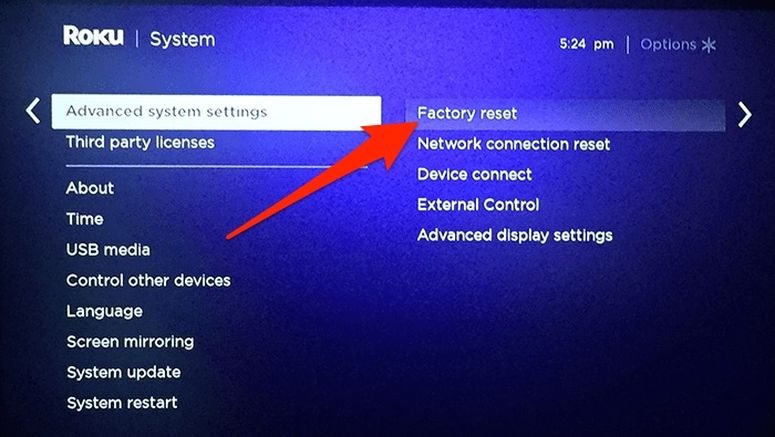
Caution:- Factory reset will remove all your data and unlink the device to your Roku account. If you don’t want that, make sure you followed all the other solutions given here.
- Press the home button on the remote of your Roku TV.
- Now follow Settings>> System>> Advanced system settings.
- Choose Factory reset.
- On the next screen, select Factory reset everything.
- Follow on-screen instructions to complete the process.
Frequently Asked Questions
Of course, you can. That’s the purpose of this article. You can check the built-in speakers or remote, and fiddle with a few of the options to make the Roku TV louder.
It’s not possible to pinpoint a single reason. A faulty speaker can be the issue or automatic audio levelling may also be the reason.
TruVolume is an awesome feature that makes the audio experience consistent and comfortable. Once you enable the option, you will receive a more enjoyable multimedia experience.
First, you have to go to Settings>> System>> Advanced System Settings. Then, follow Factory reset>> Reset TV Audio/ Picture Settings. This way, you can reset only the audio settings without impacting personal preferences or already existing data.
All the eight solutions we have given you here talk about increasing the volume of your Roku. You should try re-pairing the remote, examining the in-built remote, resetting audio settings, doing a system reset and a few more. Opt for a complete factory reset only when you have no straws to hang onto.
Also Read:- How To Protect Your Phone with The Best Monitoring Software For iPhone?
Conclusion
Yaay, we hope you have escaped the Roku volume too low menace. You got about eight potential solutions. Do not go random. Start from the first fix itself. We are sure that you will hit the gold soon enough. Do not forget to share with us if you have any other workarounds. We will update this article with those soon.
Cite this page
Thakur, T. (2022, December 17). Roku TV Volume Too Low (How to Fix It!). XtendedView. https://xtendedview.com/roku-tv-volume-too-low/
Thakur, Tushar. “Roku TV Volume Too Low (How to Fix It!).” XtendedView, 17 Dec. 2022, https://xtendedview.com/roku-tv-volume-too-low/.
Thakur, Tushar. “Roku TV Volume Too Low (How to Fix It!).” XtendedView, December 17, 2022. https://xtendedview.com/roku-tv-volume-too-low/.
Source: <a href="https://xtendedview.com/roku-tv-volume-too-low/">Roku TV Volume Too Low (How to Fix It!)</a>, XtendedView