

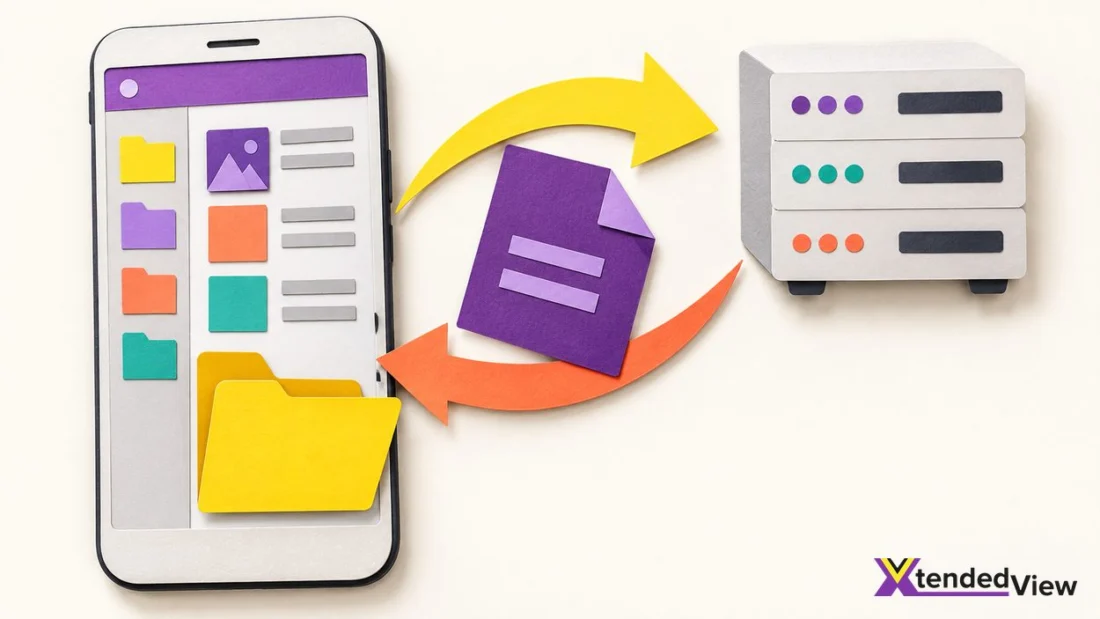
One of the things you could not have imagined doing in 2010 is maintaining your website using an Android smartphone. Although most of us don’t want to, we can do that now. In fact, there are some cool Android apps that let you get this job done. Suppose you are on the run and your client wants to make a slight change to the website content. Instead of opening up the laptop, you can do this from your Android phone and all you need is a decent FTP client. Of course, you would need an HTML editor for Android as well, but that’s a latter need.
Recommended Readings:
- 4 Best Free Antivirus for Android Phone
- 5 Best Cartoon Making Software & Websites To Create Your Own Cartoon
About Android FTP Clients
It may not surprise you that Android can access FTP protocol, right? So, Android FTP clients help you when it comes to accessing the content in an FTP server. You will need the right credentials for logging in and you will be able to see the available files and directories. The best part? You can upload and download files. So, in a situation like the one we mentioned above, you will be able to download the HTML file, edit the code and upload it back to the server. And today, we have listed the best five FPT clients for Android.
 #1 AndFTP
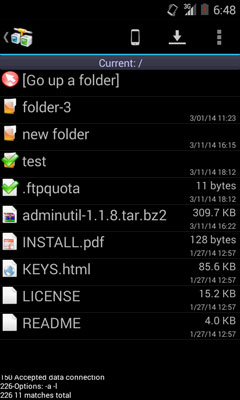
AndFTP, which is apparently a short form for Android FTP, is a great option when you need a functional and reliable FTP client for Android. Sure, it does not boast the best designs or the most modern UI. But, if you’ve some experience with FTP server, you know that you don’t need those. Instead, however, it offers a rather direct way to deal with files.
The developers made this FTP client long way back and that ensures some kind of compatibility. You will be able to use AndFTP on almost every Android device currently in use. On the brighter side, the app is free to use and offers support for almost all the popular protocols. It’s also good that you don’t need an additional course to get started with AndFTP.
 #2 FTP Server
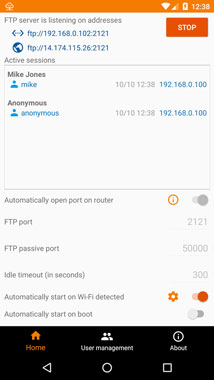
FTP Server is another easy-to-use FTP client you can use for Android. This app is also noted for the intuitive User Interface among other things. The best part is that the tool is pretty new and it has support for multiple FTP users. You can possibly use the app for managing your website in a fully-fledged manner, which is pretty great to begin with.
There are so many features to talk about, such as the support for active and passive modes and the ability to use different network interfaces. There are also some automation features that give you convenience in the best form. At the end of the day, you have a clean tool that you can depend on while transferring data to and from.
 #3 FTPCafe
Another old-but-gold app you can find on the Play Store, FTPCafe is a great choice if you need something that is still functional. Just like the first app we have listed, this one does not want you to learn anything new to master the purpose. Instead, you can focus on the right parts, such as the support for so many protocols and authentication options.
While we think the UI of FTPCafe could have improved, the job is done quite cleanly. Resume-support is an amazing feature since you don’t have to worry about internet shutdowns or data loss. Altogether, FTPCafe is a great shot for most people if you can deal with the rudimentary UI.
 #4 Web Tools: FPT, SSH, HTTP
Web Tools: FPT, SSH, HTTP is quite different from the other products we have listed above. Instead of being a dedicated FTP client, this is a complete toolkit for taking care of your website. Included in the package is a super-easy way to control your files and monitor the network. The best part is that you will be able to use it for both FTP and SFTP.
You even get an SSH client for advanced productivity. You should check out Web Tools: FPT, SSH, HTTP if you are looking for the best experience in town. We are pretty sure that you will use most of the tools that you can find in the package. And, by far, this is the best FTP client you can find on Android, despite being not so popular.
Have you used any better FTP clients for Android before? Do let us know through your comments below.
 #5. Admin Hands
Want our recommendation? Here it goes! Rated 4.5-stars on Play Store, Admin Hands is one of the most sought FTP clients for Android. With support for SSH, TELNET, SFTP, FTP, and HTTP, you can’t just ignore its existence.
Let’s give you a gist of the features. A secure password manager with AES-256 protection, batch actions, ultra-fast multi-threading up to 128 threads, terminal themes, password generator, command or script execution, you name it! Admin Hands got them all. Recently they have added facilities like material design, text editor with syntax highlight, SSH monitoring widget plus, and a few others.
The free version imposes a limit of a maximum of 5 hosts. However, you can always overcome the same by paying $1.99 per month. Weighing a few hundred bytes over 8 MB, Admin Hands is a certain Swiss Army Knife for your server management needs.
 #6. PowerFTP
PowerFTP is an out-of-the-world experience for those who despise limits on free versions. Although there are both versions available, the differences are hardly any.
Unlike our sixth listing (FTP Client), PowerFTP allows you to transfer any amount of data. And, its inbuilt text editor helps you alter the files in any which way you want. Not only that, the automatic synchronization to stay up-to-date with the changes happening with the files is astounding.
If you connect to a server via SFTP (SSH) mode, PowerFTP shows you a console to fiddle with. Do you think it’s too nerdy to get your hands on? Wait a minute! You can go with the regular drag/drop or copy/paste method. A few ads will pop up on the free version, and the split-screen feature isn’t available there. You can always go premium to throw away these limitations.
 #7. Solid File Explorer
You were not expecting this, were you? ES File Explorer was the favourite file manager for many. With Google pulling it out from the Play Store, Solid File Explorer has risen to fame. Of course, it’s a capable file managing app. Plus, you can use it as an FTP client too.
Setting up the server is no hassle. You have to open the app, click the hamburger button on the top-left, scroll down and choose FTP Server. On the next screen, it will display all the details including the URL. Just tap the Start button.
Now, you have to use the URL from any device to access files on the server. Solid File Explorer also offers password protection, an option to change the directory, and more. If you have the app installed on your Android device and what you need is a simple file transfer utility, look nowhere. Just go with this one!
 #8. Termius
Are you looking for an Android FTP client to manage Unix or Linux systems? Termius is the best pick for you. Comes with hardware keyboard support, it has a myriad of features up under the sleeve. You don’t have to do anything in particular if you switch from OS to OS (say for example Raspberry to Ubuntu) because the app comes with automatic operating system recognition.
They have also built desktop applications for Linux, macOS, and Android. So, no matter what device you have at the moment, managing servers is not going to haunt your mind. As for safety, Termius has password/ key protection and two-factor authentication in action.
Going for the premium version equips you with even more features. Want to have a glance at what they are? Cross-device sync, CLI tool to export ~/.ssh/config, SFTP client, SSH key agent forwarding, terminal tabs, HTTP/SOCKS proxy, fingerprint protection, and the list goes on.
 #9. FTP Server
Here comes yet another best-rated FTP client for Android! As long as you are looking for a way to transfer files between your phone and a secondary device, you can always bank upon FTP Server. They offer all the services for free in exchange for a few ads.
In case you hate seeing advertisements, there’s always a way to opt for an ad-less experience. You can transfer files between multiple users (including anonymous) and have multiple access paths for each other.
A unique feature we stumbled upon on FTP Server is its automation capability. You can set the app to always start the server when connected to a wireless network or just after the bootup. Not to mention, it does support multiple file transfers.
Conclusion: Best FTP Client Android
There you go! We have brought to you a list of the nine best FTP clients for Android. It’s now your turn to pick one based on your needs. All of them do their job in the best way possible. However, the availability of features may vary from app to app. Try them out and let’s know how they fare.
Cite this page
Thakur, T. (2024, March 20). Best FTP Clients for Android. XtendedView. https://xtendedview.com/best-ftp-clients-for-android/
Thakur, Tushar. “Best FTP Clients for Android.” XtendedView, 20 Mar. 2024, https://xtendedview.com/best-ftp-clients-for-android/.
Thakur, Tushar. “Best FTP Clients for Android.” XtendedView, March 20, 2024. https://xtendedview.com/best-ftp-clients-for-android/.
Source: <a href="https://xtendedview.com/best-ftp-clients-for-android/">Best FTP Clients for Android</a>, XtendedView




8 reader comments closed March 20, 2025
This post must be for geeky people. I wonder who other people uses FTP from mobile.
Indeed.
What do you mean by FTP clients? I didn’t it.
FTP means File Transfer Protocol. It uses in uploading a website’s content. Mostly it is used by developers.
I try to avoid using FTP from mobile because once I updated the wrong file and my whole website went down.
I can understand that John.
This is useful. I do web design and development for my clients. Clients sometimes call you anytime and ask to update small things such as text or colow. Using mobile FTP apps I can do that even if I am outside of my desk.
Yes Mike. That is the main use of FTP android apps.
This thread is closed to new comments.