
Close Menu
    Facebook X (Twitter) Instagram
    Facebook X (Twitter) Pinterest LinkedIn
    XtendedViewXtendedView
    • Home
    • Technology
      • Computer
      • Artificial Intelligence
    • Internet
      • Cybersecurity
    • Gadgets
      • Gaming
    • About
      • Our Team
    • Contact us
    XtendedViewXtendedView
    Home»Computer»How to Change Operating System Name in Windows

    How to Change Operating System Name in Windows

    Tushar ThakurBy Tushar ThakurMarch 24, 2024 Computer
    Facebook Twitter Pinterest LinkedIn Telegram Tumblr
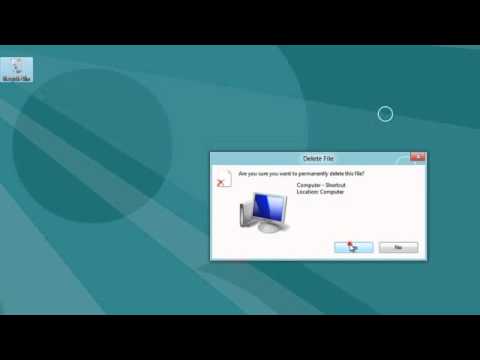
    Windows 8 Delete File dialog asking to permanently delete the Computer shortcut
    Share
    Facebook Twitter LinkedIn Pinterest

    Nowadays, there are very fewer chances of one Operating System being installed on a Computer. Because multi-boot offers the functionality to boot more than one Operating System on a Computer. Ultimately, we are Microsoft fans and Windows OS is in our blood. Undoubtedly, Windows OS is the one which is installed on almost every Computer because it’s handy to use. Apart from that, we have several other Operating Systems available to use. So, keeping Windows OS as the primary OS, we can install and use any other Operating System with the help of Multi-booting.

    But, what if, anyone installs “Windows 7 32 Bit” and “Windows 7 64 Bit” Operating Systems on the same Computer, will there be any problem at the time of selecting OS (multi-boot)? Of course, there will be a big problem since both versions are simply listed as Windows 7. In Windows Boot manager, there is no way to differentiate 32-Bit version and 64-Bit version. So, how to identify both differently? For that, I have a trick and today I will share that amazing trick with you guys!

    Let’s start

    At the best, we can change the Operating System name in the Windows Boot manager with the help of an elevated command prompt. Continuing, you can follow the below tutorial to do so.

    1. Open a command prompt under the Administrator privileges.

    2. In the open command prompt, type bcdedit and hit enter.
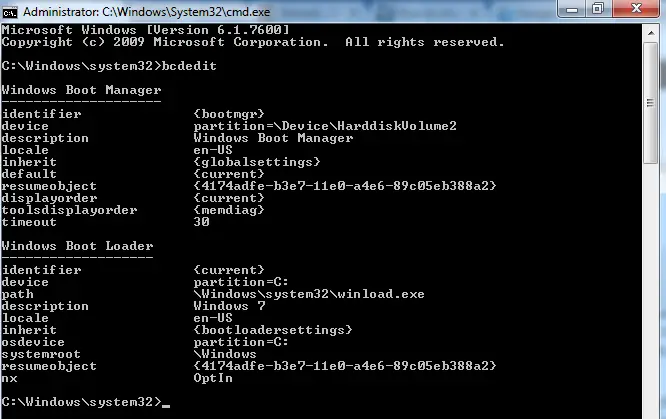
    Screenshot_1

    3. Now, to change the Operating System name type the following command in the elevated command prompt.

    • bcdedit /set {identifier} Description “your specified name”

    For Example: I have only one OS installed on my Computer is Windows 7 and I want to change its name then I will type below command:

    • bcdedit /set {current} Description “Windows 7 64-Bit”
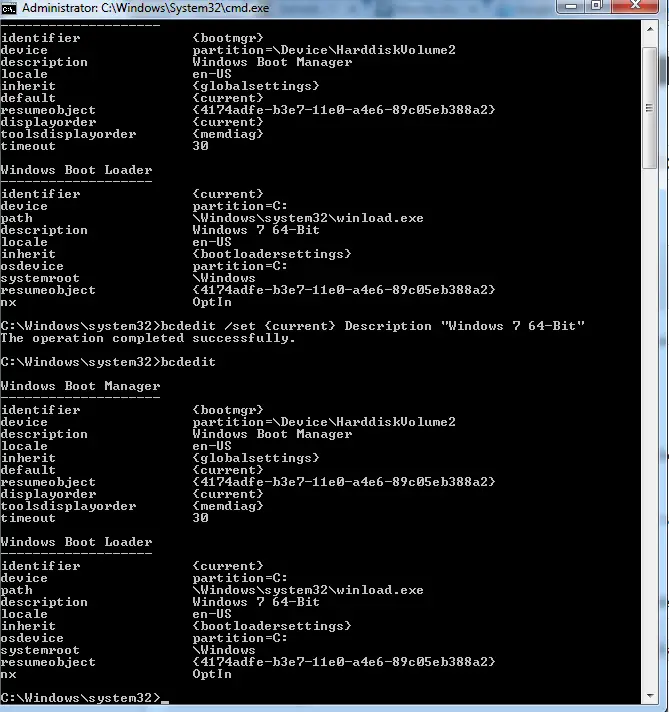
    Screenshot_2In the above code, {current} refers to identifier and Windows 7 64-Bit refers to Description.

    4. Again, type bcdedit in the elevated command prompt and hit enter. You can verify that the Operating System name is changed successfully.
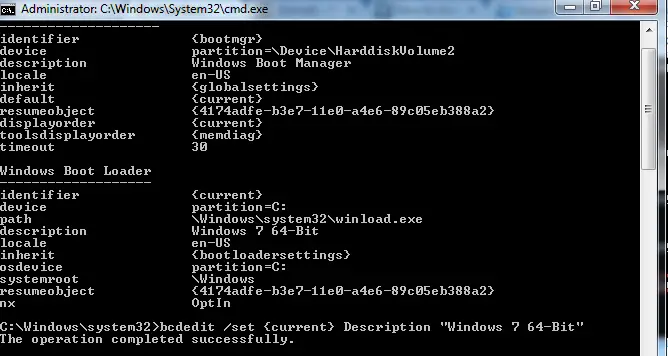
    Screenshot_35. When you restart your Computer, your specified Operating System will be listed in Windows Boot manager.

    Hence, you can easily distinguish different version of same Operating System. I hope you find this guide useful. In case, if you face any issue while performing any of the step then do report us in the below comments box! Enjoy the trick and don’t forget to share with others also.

    Easy method:

    You can install software Easy BCD Edit and can do the change very easily.
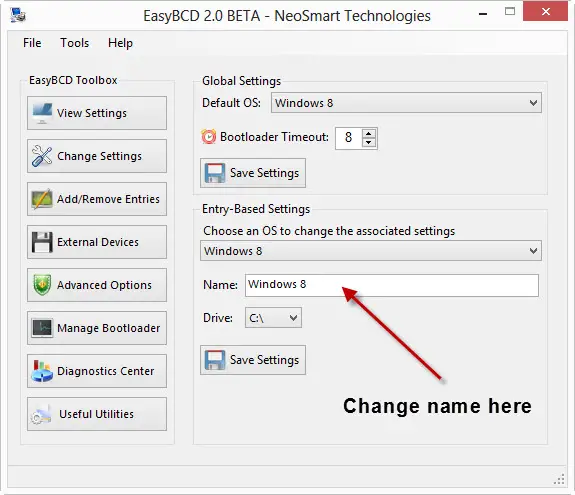
    final easy bcd edit

    Don’t ask why to change the name. J its fun to play along with the computers.

    Share. Facebook Twitter Pinterest LinkedIn Tumblr
    Tushar Thakur
    Tushar Thakur
    • Website
    • Facebook
    • X (Twitter)
    • LinkedIn

    Tushar Thakur founded XtendedView in 2011 while studying Electronics and Instrumentation Engineering in Mumbai, and in 2013 IndiBlogger named it the best blog in its gadgets category. He has spent more than a decade building tech blogs and working on search optimisation and online marketing, and co-founded the agency WebGeeksMedia. He sets XtendedView's editorial direction and writes about Windows customisation, Android tweaks and the gadgets he tests himself.

    Related Posts

    Diagram of a MAC address split into organizationally unique identifier and device parts

    How To Change MAC Address Of Android With or Without Rooting

    July 12, 2025
    Illustration of a white computer mouse with a curved cable

    How to Fix Mouse Lag in Windows 10

    July 12, 2025
    Best SpeedFan Alternatives

    8 Best SpeedFan Alternatives for Computers for Windows and Mac

    September 4, 2024
    Illustration of a laptop with a stopwatch and rising arrow showing improved speed

    How to Make your Existing PC to Run on Windows 10 smoothly

    September 2, 2024
    Smartphone surrounded by colorful app icons

    10 Best Android Apps to Scan Documents from your Mobile (Free and Paid)

    September 1, 2024
    Micro SD card inserted into the Micro SD slot of a card reader

    How to Remove Write Protection From Micro SD Card

    April 15, 2024
    View 10 Comments

    10 Comments

    1. Sarvesh Mehta
      Sarvesh Mehta on March 13, 2020 10:29 am

      What’s the procedure to change the name for Dual boot Linux Installation? Can we follow the same process for renaming the Linux OS installed in other partition?

      • Tushar Thakur
        Tushar Thakur on March 13, 2020 10:52 pm

        Yes it should work for that too.

    2. Larry Campbell
      Larry Campbell on April 12, 2020 9:00 am

      What’s the difference between 32Bit OS and 64Bit OS?

      • Tushar Thakur
        Tushar Thakur on April 12, 2020 8:20 pm

        https://www.geeksforgeeks.org/difference-32-bit-64-bit-operating-systems/

    3. Paul Cook
      Paul Cook on April 12, 2020 9:08 am

      Hello. Facing the “Valid Boot Order Not Found” error. What to do?

    4. Linda Southern
      Linda Southern on April 12, 2020 9:11 am

      After entering the “bcdedit /set” command, I am seeing only the “Boot configuration data store could not be opened” error message. what to do?

    5. Yuri Futanari
      Yuri Futanari on November 30, 2020 6:21 am

      Does this program allow you to fool programs which require a newer version of Windows? I have specifically a very custom built version of Win 7 SP1, but there are a few recent updates which now refuse to install on 7, simply because MS stopped supporting it, even though it is virtually the same identical OS underneath everything.

      MY idea is to simply rename anything in any file which would suggest to an installer package that the machine is Win 7, to some more up-to-date OS version, just so it will go ahead and install the program.

      If it DOES that, I’m all for getting it! (~_^)-b

      If it does not fool installer programs, its of no use to me. ~( ,m,)~

      Any input on this please?

      • Tushar Thakur
        Tushar Thakur on December 1, 2020 9:14 am

        haha nice idea. I need to check on that. Anyway thanks for your comment.

    6. Brenda
      Brenda on July 12, 2021 5:40 pm

      WIll this work in Windows 11? Please let me know.

      • Tushar Thakur
        Tushar Thakur on July 12, 2021 5:42 pm

        Yes It will work just fine. Do try and let me know if you found any issues.

    Stay In Touch
    • Facebook
    • Twitter
    • Pinterest
    • LinkedIn
    Mobile Accessories Statistics 2026: Earbuds, Chargers and USB-C Data

    Mobile Accessories Statistics 2026: Earbuds, Chargers and USB-C Data

    October 22, 2026
    AI in HR and Recruiting Statistics 2026: Use, Trust and Rules

    AI in HR and Recruiting Statistics 2026: Use, Trust and Rules

    October 20, 2026
    Real Estate Social Media Statistics Platforms and Leads

    Real Estate Social Media Statistics 2026: Platforms and Leads

    October 16, 2026
    Amazon Echo Vs Google Nest Statistics

    Amazon Echo vs Google Nest Statistics 2026: Key Trends & Surprising Insights

    September 26, 2026
    Recent Posts
    Mobile Accessories Statistics 2026: Earbuds, Chargers and USB-C Data

    Mobile Accessories Statistics 2026: Earbuds, Chargers and USB-C Data

    October 22, 2026
    AI in HR and Recruiting Statistics 2026: Use, Trust and Rules

    AI in HR and Recruiting Statistics 2026: Use, Trust and Rules

    October 20, 2026
    Real Estate Social Media Statistics Platforms and Leads

    Real Estate Social Media Statistics 2026: Platforms and Leads

    October 16, 2026

    Subscribe to Updates

    Get the latest creative news from FooBar about art, design and business.

    About

    At Xtendedview, we simplify tech and blogging for everyday users. Our goal is to share real, practical tips, while helping you avoid the mistakes we’ve already made. From gadgets to blogging hacks and money-making strategies, every article is written to actually help. Whether you're just starting out or looking to grow, we’re here to support your journey online.

    Facebook X (Twitter) Pinterest LinkedIn
    • All Articles
    • About
    • Our Team
    • Contact us
    • Fact-Check Policy
    • Editorial Policy
    • Statistics Methodology
    © 2011 - 2026 XtendedView. All rights reserved. | Privacy Policy | Terms of Use | Disclaimer | Site Map

    Type above and press Enter to search. Press Esc to cancel.