


Close Menu
    Facebook X (Twitter) Instagram
    Facebook X (Twitter) Pinterest LinkedIn
    XtendedViewXtendedView
    • Home
    • Technology
      • Computer
      • Artificial Intelligence
    • Internet
      • Cybersecurity
    • Gadgets
      • Gaming
    • About
      • Our Team
    • Contact us
    XtendedViewXtendedView
    Home»Internet»4 Ways: How to Protect wp-config.php of your WordPress from Hackers

    4 Ways: How to Protect wp-config.php of your WordPress from Hackers

    Tushar ThakurBy Tushar ThakurMarch 20, 2024 Internet
    Facebook Twitter Pinterest LinkedIn Telegram Tumblr
    WordPress logo
    Share
    Facebook Twitter LinkedIn Pinterest

    WordPress is now the most using CMS all over world. So obviously the WordPress hackers are increased. This post will guide you to protect your WordPress from those hackers who interested to target your main security file named wp-config.php. We will see the different methods to protect wp-config.php file.

    Gold padlock engraved with the WordPress logo

    Image Rights reserved at respected owner.

    What is wp-config.php?

    The wp-config.php is a file inside your WordPress supporting files directory. It has the username and passwords for the MySql database, special signature of authority.

    To know about wpconfig.php read this post:

    • What is wp-config.php?

    Why hackers target wp-config.php mostly?

    As mentioned above the file contains very sensitive and important password information the first target of any hacker is to edit or modify the wp-config.php file. Once the hacker got the access to this file it can harm your site in any way. It can delete your post or anything that harm your site.

    What hackers can do after modifying your wp-config.php file?

    • They can delete your post
    • Add likes to any spam websites behalf of you
    • Delete your hosting files.
    • Modify users of site.
    • Run illegal script on your site.
    • De-index you from search engines from Google.
    • Add 301 permanent redirect to your all site’s url to any other url

    1)      By using .htaccess method:

    .htcaccess is a file that exists inside the root directory of your hosting. This file can use to set control the visitors that coming in the root directory.

    This is very simple.

    Go to your root directory i.e. where your wp-config.php saved and you will find file named “.htcaccess” just edit it and add the following code to it.

    [php]
    <Files wp-config.php>
    order allow,deny
    deny from all
    </Files>
    [/php]

    2)        By moving wp-config.php to other location:

    To see how this can be done read this post:

    • Simplest way to move your wp-config.php file to another location in WordPress

    3)       By setting permissions 644 from cpanel:

    By default the permission all WordPress core files are set to 644 but sometimes when you edit files inside your cPanel and save it again the permission may change. It is very important to check the permissions because it you change the permission of any file by mistake then it will be very easy for hackers to hack your WordPress.

    See image below, It is taken from file FTP client:
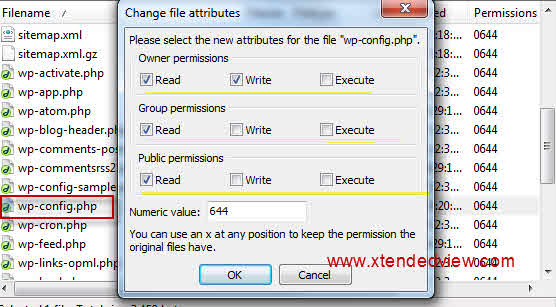
    change wp file permission
    change wp file permission

    4) Set your own Secret keys inside wp-config.php file

    Wp-config.php has many security keys. They are nothing random phases used for the security reasons. Use your own custom security keys can stop any hacking attack to your WordPress. You can generate random keys here.

    Recommended Readings:

    • Windows live writer to your wordpress site
    • Procedure to add Breadcrumb (page navigation) to alltuts theme wordpress
    Share. Facebook Twitter Pinterest LinkedIn Tumblr
    Tushar Thakur
    Tushar Thakur
    • Website
    • Facebook
    • X (Twitter)
    • LinkedIn

    Tushar Thakur founded XtendedView in 2011 while studying Electronics and Instrumentation Engineering in Mumbai, and in 2013 IndiBlogger named it the best blog in its gadgets category. He has spent more than a decade building tech blogs and working on search optimisation and online marketing, and co-founded the agency WebGeeksMedia. He sets XtendedView's editorial direction and writes about Windows customisation, Android tweaks and the gadgets he tests himself.

    Related Posts

    Amazon Echo vs Google Nest Statistics 2026: Key Trends & Surprising Insights

    September 26, 2026

    YouTube Influencer Marketing Statistics 2026: ROI, Trends & Growth

    September 22, 2026

    Adobe Creative Cloud Statistics 2026: Key Trends, Growth & Insights

    September 20, 2026

    Microsoft OneNote Statistics 2026: Powerful Trends

    September 18, 2026

    Substack on Windows: Reading, Listening, and Following Independent Writers

    September 16, 2026

    Airtable Statistics 2026: Powerful Trends Revealed

    September 5, 2026
    View 4 Comments

    4 Comments

    1. ashish
      ashish on November 17, 2012 12:11 pm

      how to protect wordpress blogs especially from sql injection attacks?

    2. Scott Brown
      Scott Brown on February 9, 2022 10:22 am

      Hi
      I am having issues with hackers.
      I have tried steps 1, 2 & 3.
      I have found that a hacker is injecting code at the start of the wp-config.php file.
      Moving this file will not stop this injection as the wp-config.php file is still in the root directory.

      Do you have any other suggections?
      Thanks

      • Tushar Thakur
        Tushar Thakur on February 10, 2022 6:29 pm

        Hi,

        Did you tried to contact Hosting provider?

    3. Saguna
      Saguna on June 24, 2023 7:53 pm

      Thank you for your article.
      Through which do hackers usually enter our website WordPress based?

    Stay In Touch
    • Facebook
    • Twitter
    • Pinterest
    • LinkedIn

    Amazon Echo vs Google Nest Statistics 2026: Key Trends & Surprising Insights

    September 26, 2026

    YouTube Influencer Marketing Statistics 2026: ROI, Trends & Growth

    September 22, 2026

    Adobe Creative Cloud Statistics 2026: Key Trends, Growth & Insights

    September 20, 2026

    Microsoft OneNote Statistics 2026: Powerful Trends

    September 18, 2026
    Recent Posts

    Amazon Echo vs Google Nest Statistics 2026: Key Trends & Surprising Insights

    September 26, 2026

    YouTube Influencer Marketing Statistics 2026: ROI, Trends & Growth

    September 22, 2026

    Adobe Creative Cloud Statistics 2026: Key Trends, Growth & Insights

    September 20, 2026

    Subscribe to Updates

    Get the latest creative news from FooBar about art, design and business.

    About

    At Xtendedview, we simplify tech and blogging for everyday users. Our goal is to share real, practical tips, while helping you avoid the mistakes we’ve already made. From gadgets to blogging hacks and money-making strategies, every article is written to actually help. Whether you're just starting out or looking to grow, we’re here to support your journey online.

    Facebook X (Twitter) Pinterest LinkedIn
    • About
    • Our Team
    • Contact us
    • Fact-Check Policy
    • Editorial Policy
    • Statistics Methodology
    • Disclaimer
    • Terms of Use
    • Privacy Policy
    © 2011 - 2026 XtendedView. All rights reserved. | Site Map

    Type above and press Enter to search. Press Esc to cancel.