


Windows 8 is new version of windows operating system. Still in the development while I am writing this post. For increase in the security and make it more compatible with multi user environment password has been set. Please make sure to use a best antivirus program on your Windows like Bitdefender or Kaspersky which will stop possible computer virus infections. Even if you install windows 8 with a internet connection connected then it will automatically asks for create Hotmail use ID and password. If you already have you can login with it. Now the windows 8 will set that Hotmail email ID and password for your windows login. That is [email protected]. You need to enter your password each and every time when you turn on the computer.

Need of disabling the logon password in Windows 8:
If you are home user or just single user of your computer then it will be time waste to enter the username and password each and every time when you logon the widows. No need to make this step? Then you can skip it and set as auto login in the windows 8, like Windows 7 or Windows XP.
The steps are very easy. To disable the password prompt you need to set auto login inside the user account settings.
Step 1)
Login to your user (Admin) i.e. just start the Windows 8 with your username and password.
Step 2)
Open command prompt (shortcut “Windows key+R”) and type “netplwiz” without quotes. Or you can just open the Metro UI screen and start typing “netplwiz” it will give you the result under app search like this:

Step 3)
Click on that and other windows will open. In that window uncheck the box shown below:
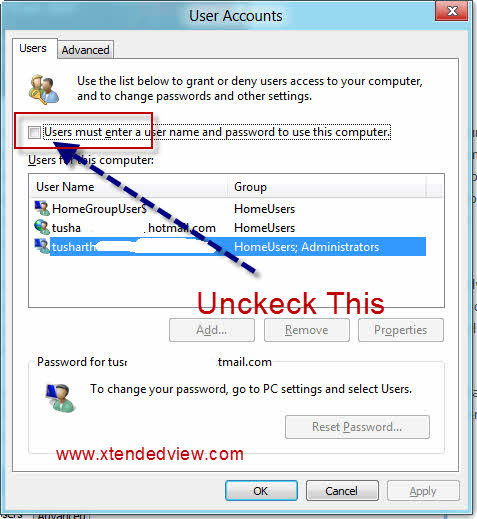
On the next window enter your username and password.
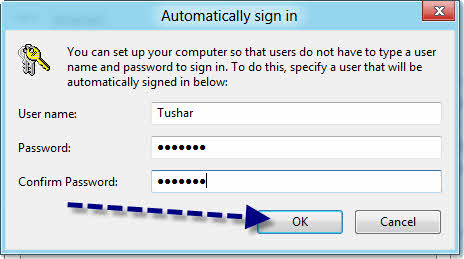 That’s it now click OK and restart your computer to see the effect. Yup now you don’t need to enter the username and password each time when you logon the Windows 8.
Part 2. Forgot Your Windows Login Password, Let’s Reset it!
If you’ve lost the password for your Windows computer, and are now unable to gain access to your system, you can use 2 different methods to open it up again and log in. The first is to re-install Windows, and lose all your files, settings & data. This is a very costly process and is very complicated to do. The second is to “reset” the password of your system, and regain access by removing the stored password information that your PC has inside used Windows 7 Password Genius. This method will not lose you any settings/files, and will grant you access again by removing the stored password data on your system.
Here we highly recommend using iSeePassword Windows Password Recovery program to hep you reset your Windows login or admin password without system res-installation. What you need to prepare is an USB drive and another accessible Windows computer. It not only can help reset admin password on Windows 7, but also works with windows 8, 10, XP and vista.
See this guide: How to Reset Windows 7/8/10 Password with iSeePassword.
Step 1: Install iSeePassword Windows Password Recovery tool on this prepared Windows PC.
Step 2: Insert your USB drive and blank CD/DVD into the PC and click “Burn” to start burning an iso image of this software on the chosen media.
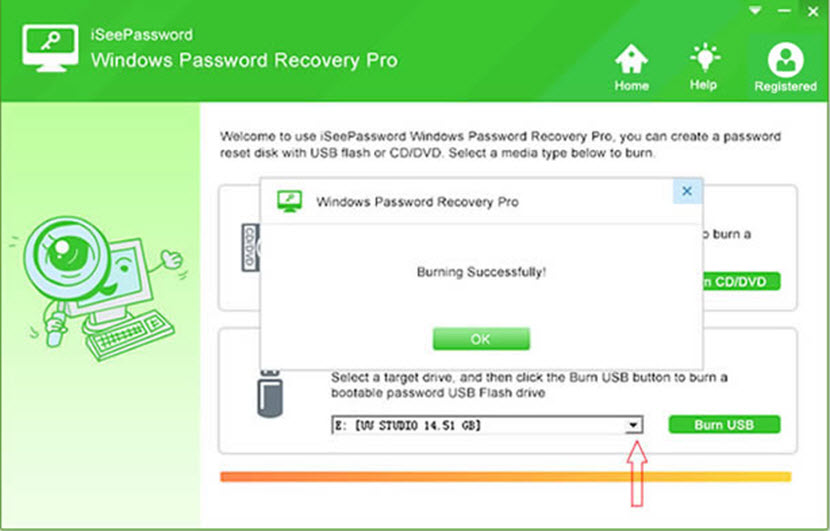
Step 3: Set your locked computer boot from USB drive in the BOIS setup, this the program will be loaded and detect all users on your computer. Select the type of your account password you want to reset. Click “Reset”.
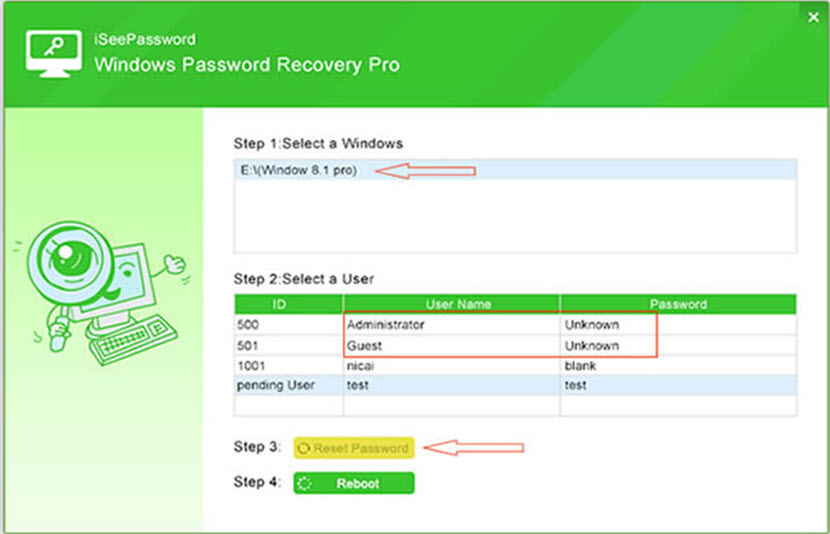
Now, you can login your Windows 7/8 computer without password. If you’re Windows 10 users, this resetting tutorial also works fine.
Conclusion: When you forgot your Windows login password, and don’t want to lost your important files on your computer, the most effective way is try iSeePassword Windows Password Pro program to reset it to blank and login without password protection. You can also burn a password reset disk with USB and DVD and use it for the future.

197 Comments
I’m not sure why, but even after following these steps my laptop still makes me enter a password every time I log in. It’s very annoying, as I’m the only one that uses it. I don’t need it password protected.
Cant understand why. Once you done it restart the laptop and agin go to the steps and check that option is checked or unchecked (Step 3) If it again checked means your OS have some malware or virus infection.
Well I KNOW it’s not spyware or malware because my computer is brand new and only been on for 3 hours. And I DO have adware/spyware/virus protection active on it. And I still have to log in every stupid time. I really am not liking Windows 8 at all.
Did you check to see if it is the HP Protect Tool ? It could be this software that is requesting the password. If it is this you will need to Uninstall this software from your program’s. hope this helps
Tushar’s solution worked for me. If you have an HP, go to your power settings. You can choose whether or not you want to use a password with battery or power. I hope that solves the problem for you.
Hi,
Thanks. This option is available on every PC irrespective of HP.
Thanks a lot. I got fed up when my PC asks PW every time it wakes up from sleep. The power options u told worked fine. Thanks again.
You are welcome. 🙂
I reset my password using PasswordResetter(dot)info in about 5 minutes. Last night, my wife decided she needed a password for her computer (this is after using it for 2 years without a password). Today when she powered it up, guess what? Wrong password. I found this website which helped me unlock her account in just a few minutes. Amazing! Kinda scary that it works as well as it does!
I just got my laptop today, I’m pretty darn sure it has NO viruses or malfunctions.
To Kenny I’m in the same boat as you, but there’s myself & my boyfriend who are using this laptop but we don’t want the passwords.
You may have a password set in your system BIOS.
To remove a password in the BIOS you will need to enter the BIOS configuration as your computer starts up, but before your operating system loads.
You will only have about 1 second to enter the BIOS menu so you must watch closely for a message that will tell you what key to press to open the BIOS Menu. For most computers it is the Delete key but it may vary depending on the BIOS manufacturer.
Your pointing device (mouse or touch pad) may not function in the BIOS Menu but the keyboard commands for navigating the menus will be listed on screen.
The location of the password also varies so you may need to go through the menus until you find it.
Be careful not to change anything that you do not fully understand or you could cause your computer to not function properly. If you are unsure about any change that you may have made use the “exit without saving” command then restart your computer and try again.
After removing the password, use the “exit and save changes” command and your computer will restart.
I forgot my login password on Windows 8. To remove password, i got Windows Password Recovery Tool 3.2 to help me unlock pc easily!
That’s flat out false. Same thing happens to me and I don’t have any malware or virus. This process works on my pc but not my tablet
Thank you! I’ve been so annoyed with this setting since I bought this computer!
How to I type netplwiz without unlocking username & password
You said this option is on every computer. Not mine. The small check box isn’t on the page of administrator. I have had this problem since Microsoft added a web search engine and their page is all that can be used. I’ll find duck duck go and before I’ve been to 3 sites, Microsoft edge page id taking over again. I want anything forced on me off.
I have tried at least 10 methods to remove the requirement from entering my password in Windows 8 and at best it works only on the initial restart, then I am again required to enter my password indefinitely. Any Advice ?
It didn’t work for me either. I’ve 2 different methods so far and had no success. I still have to enter y password each time. I notice the user name is different on the screen that automatically comes up on this method than comes up on the usual start upstart up. Would that make a difference?
Peggy,
I have tried fixes from 10 Web Sites and none of them works for me ! I also get my first name on the window you mentioned while my full name is on the “Password” screen. I have entered both and neither works ? Did you try the Windows Logo + R – type in the command “control.exe/name Microsoft PowerOptions/page page GlobalSettings” ?
If you figure out what “name” is let me know ! How about “Control Panel” – “Power Options” – click on “Require Password, etc.” – “Change Settings, etc.” – “Don’t require a Password” ? Believe me I have tried them all and that annoying PASSWORD continues to show up. Good Luck
does not work through control panel. Windows R the box not selected, I restarted hard way does not work.
Windows, in their continued lunacy, figured this FIX was a bug and they have since “fixed” the bug. This work-around no longer works.
Instructions
Turning Off Sleep Mode – Windows
1
Go to the “Start” button, then click on “Control Panel.” In the control panel screen, click “System and Maintenance,” then click on “Power Options.” This brings you to the “Select a power plan” page.
2
From the “Select a power plan” page, select the option that says “Change plan settings.” This changes the settings on the currently selected plan.
3
Select the “Change advanced power settings” option. Click “Sleep” and then click on “Sleep After” to expand it. If using a laptop or mobile PC, click “On battery” and “Plugged in,” then select the “Never” option. This turns off sleep mode for both battery and AC use. If you are using a desktop computer, click “Setting,” click the arrow and then click “Never” to turn off sleep mode.
4
Click “OK,” then click “Save changes” to save the modification.
this is to stop the password when your pc or laptop has gone to sleep
This helps me.
It really good to hear that you found it useful, Keep visiting the website for more useful updates.
i didn,t see how to remove windows 8 password
1) For Windows 8, click on your profile picture found in the top right corner of the Windows 8 start screen.
2) Next, it will give you option like Sign Out, Lock, and Change Account Picture. Click Change Account Picture.
3) On the left you’ll see a list like Personalize, Users, etc. Click Users.
4) Under Sign-In options click ‘Change your Password’
5) Enter your current password
6) When it tells you to enter a new password just leave it blank.
7) Retype your new password (leave it blank again)
8) You’re done!
Thanks a lot for your time. 🙂
you cant leave it blank, it requires you to type a password .
Kevin, I agree with you that this method does NOT work for everyone. My computer refuses to budge if I leave it blank! Have you found another method which works for you? I have upgraded to Windows 8.1. This password nonsense for only one user is extremely frustrating.
Hi
Thank you so veryyyy much… it worked… I just removed my password . I have been trying to remove it from the past few days but none seemed to work… Thank you so much …:)
None of these “fixes” work. Come on people, help us!!!!!
this way helped me a lot! thanks!
Dear Tushar Thakur,
Thank you so much ,
Dear helper,
thanks a lot it is much easier u r grt 🙂
Tnx, it works for my hp
It was an extra step I didn’t need or want. Thank you!
Thanks!
Thank you for this! Helped me
Thanks, this helps.
Thank YOU!! I call Microsoft and talked and also online chat for two hours and finally they said to fix this problem would be for a nomial charge of $79.99. i told them to go to h—. I only paid $59.99 for Windows 8 so they could kiss my A–. Your fix took about 2 min. thank you, thank you!!!!!!!!!!!!!!!
Travis
Was really happy to find this post (#1 spot on my google search btw).
I’m always looking for tips and tricks to make Windows 8 better, since I miss 7 already, so keep’em comin’.
Thanks. It worked well
Awesome info, Im usually the only one that uses my desktop, but occationally my wife will as well, she never remembers the pass lol
I am glad to hear that. 🙂
So how do you do it then? I’m trying to log in on my mom’s computer now, but she doesn’t remember the password. She managed to log in with her face recognition. But everything, changing/removing the password requires you to have the current password, so I have no idea how people do it…
Seems great, but it only appears to remove password login for one user. Any additional users still need to enter their passwords?
Thanks! I couldn’t find how to shut this off anywhere! 🙂
It was great to remove the login for when I first switch the computer in but now, every time I Ho away and come back I still have to log in. Ow do I remove *that* one?
If you mean when your computer goes to sleep, go to “Hardware and Sound”>”Power Options”>”System Settings” and then at the bottom “Password Protection on Wakeup”
Thanks, this was the missing bit of information I needed. I suspect everyone else commenting about how they can’t solve this problem needs to use this trick, in addition to the restart trick.
(THIS is the answer a lot of people were looking for, they just weren’t being clear about it being in sleep mode – thanks!!!)
“If you mean when your computer goes to sleep, go to “Hardware and Sound”>”Power Options”>”System Settings” and then at the bottom “Password Protection on Wakeup”
Thankyou, you saved me a lot of time
I am happy to hear that. 🙂 Keep visiting our website for the latest stuff.
Superb man Thanks a lot
This worked great on my new laptop I got today. I can start now without having to se password. Thanks
This tip is the only one that worked for me, others further up the Google page didn’t.
Thanks Tushar
Good Work Man !!!!!!!!
thank you so mutch .
you helpping me mor
i m also try this step but i cant remove user password hw can this possible i m very disspointed this window 8 plz help about this remove password,
I don’t want the system to automatically enter my password. I want to completely disable the step of having to log in. Other family members use my computer and if the computer enters my password automatically, then everyone would have access to my stuff. Any ideas on how to accomplish this? Thanks
Hey, for those Windows 8 users who noticed that windows still requires you to enter your password after waking from sleep or just logging in: Go to settings, Change PC Settings, Users, under “Any User who has a password…”, click “Change.”
Thank you very, very much. This is exactly what I was looking for.
Glad to hear that it help you. 🙂
Sorry,it didn’t help me… There was no “next window” to enter a username and password in!
Please double check it it should be there
I’ve never had to enter my password before, but after a recent update of Windows 8, I now have to enter it every time the computer starts. Also, I tried running netplwiz, but the checkbox above the list of users is gone, so there’s nothing to uncheck! And so the next window to enter username and password doesn’t appear…
Thanks Tushar,
It really worked for me in just 2mins,
as i have to return this laptop today,
before that i want to remove password, i searched in google for about 2hours and finally found this pafe.
Once again thanks and keep posting these kind of helpful tips
You are welcome lakshmi,
Keep visiting for more updates. 🙂
Thank you for your help with removing the need for a password at Startup on Win8. Your instructions were easy and worked great!
I now would like to find a better way to access the “charms” on Win 8 start screen. Swiping from left to right is often done unintentionally in the ordinary use of the mouse pad. It is a nuisance to see the charms appear when you don’t want to see them. I think there must be a command that would disable this function, then allow access to the charms by keying from the keyboard. What do you suggest?
Thank you,
Gary
Great to hear that it helps you. TO disable the charms please see this article: http://www.howtogeek.com/127645/how-to-disable-the-charms-bar-and-switcher-hot-corners-in-windows-8/
Thanks. Just what I was looking for.
My Win/8 system seems to be asking for a Windows password that I had to setup at windows.com. And, if I don’t enter a password, the system will not come up. This also implies that I must have a connection at that time to the internet. I say that because I forgot my password and had to go to the windows site to get a new password. I immediately went back to the new computer and entered the NEW password and guess what, it accepted the new password. Anyway, I am clueless how to get rid of the damn password requirement.
Have you follow the steps I given?
No, IT IS NOT THERE. Your suggestions DO NOT WORK with Win 8.1.
Great job. Works great.
Mate, that was a great post.. Definitely useful! Cheers, it worked for me!!
Great, thank you!
if some commands ask you for administrator password or prefix before for fix,add,delete or see some windows configuration info would any antivirus ask you to have log in password minds administrator security password. I should enable it again. in short, speed time for Granma’s to surf online without your log in password.
It worked! THANK YOU!!!
thank you works great! how about tutorial to change log on name?
Checked other sites and this one finally gave me the quick and simple solution.
Thank you.
Thanks! I have bitlocker enabled and am the only user of the notebook. So this saves me daily a few seconds. (ssd)
Thanks to hear that it save your time. 🙂
I’ve tried every trick listed here and elswhere. Windows 8 STILL requires a password when either user logs in. We have had this laptop less than 24 hours and I am about ready to take it back. Please HELP!
I have also exhausted all my web advice on how to eliminate the password entry requirement in my new Windows 8. The requirement to enter keeps coming back. Any Ideas ?
This was a big help. Thanks so much.
Thank You! Thank You! Bought a new laptop for the wife and she went nuts with the password. Thanks again.
Its great to hear that it saved your time. 🙂
just got new lappy with windows 8 and it sux
really hate it, wanna install vista.. so many annoying things in 8 like the lack of a start menu
the annoying startup screen and not forgetting the stupid slid in menu on the right that has a really stupid name
Download Startmenu8 then and that will fix it to look like windows 7.
Who would ever want o go back to Vista It was teh biggest crock of s**t that Microsoft ever made
Amazing! Thanks so much – really helpful!
The explanation in this article might work for most, I find it a lot easier to simply go to the Change Password dialogue, enter current password, and then click Save while all the text fields are empty. Windows 8 will accept this without error, and will caause the Metro UI to come up without having to log in.
I find this method both easier to explain eg over the phone, plus there is no password stored anywhere, so even if the PC gets hacked, no password details can be retrieved.
Peace,
Terah
No baby, trying a blank password no longer works. Any more bright ideas? Argh.
thank you so much. you really hepl me a lot
thank you, very helpful. this is one of the many little details that are difficult to figure out on windows 8. there are many things i like about this OS and also many things i do not, such as this bothersome detail. thanks again.
very usefull
Thank you
The IT guy activated/configured the windows 8 in my HP probook4540 by putting his username and password but now when i want to enter into windows, it requires password to go through. Please suggest some solution so that i can link this initail username requirement with my personal username and password as otherwise i have to ask to that IT guy for password which is not feasible at all. hope you suggest some workable solution, thanks
Hi Mohsin,
If you don’t know the password, better way to install the windows again by formatting it. It will not take more than half hour . but you will loose all installed software so better to kepp all data safe away from your C drive and collect setups of the software’s.
Excellant keep it up
Many thanks – I have only had Windows 8 for 48 hours and already pulling my hair out each time it goes into screensaver. Great job
tushar can i ask you something? if it is unchecked, the password already been removed or not? if not how can i remove the password? thanks and God Bless 🙂
Password not removed already, Rather Windows will not ask it to you each and every time you turn on your system. But keeping login password is good idea for LAN sharing and sleep and wake up to prevent unauthorized access to your computer.
thanks a lot 🙂 🙂
Welcome, Keep visiting website for more updates.
Tushar, it didn’t work for me 🙁 I did everything on the steps, and even double checked but when I restarted the laptop, I still need to enter my password. can anyone help pls? 🙁
This is very old post. Now Windows 8 or 8.1 allows you to not use any password. Simply go to change password and use empty password.
It worked thank u
My grandma is a senior and my family got her windows 8 and she locked herself out because of this password issue and this is way different from other versions windows. I could not figure this out. These steps not only fixed the problem but really helped out my grandma. Thank you so much!
Nice to hear that it helped you. 🙂
I followed your instructions and got rid of the password – however, it gave me another big headache. I cannot go in to my user account any more, and I cannot install software. A small popup window asks me to enter the administrator password to continue but there’s nowhere to enter the password, and I am completely stuck. HELP!!
I cannot even take a screenshot of the popup to show the problem.
Thank you so much for this trick..You save my brain cells. XD
Thanks…………..I hate having to type a password.
The only way I found was to reset windows 8 from scratch. When it restarted I didn’t enter a password. It didn’t take very long but remember, you will lose all settings and programs using this method.
No, You will no loose anything with this, It will just not ask you password for each time when you login.
How do you “reset” windows from scratch, and which password do I use to disable the password using netplwiz – my Microsoft Account Password or the password I am required to enter to open up the computer – they are different – should they be the same ? Thanks again for your help.
If you register or your Microsoft account at the time of installation of your windows then I am sure those passwords will be same. If they different then use the password which you use to enter each time to logon to windows.
You are always welcome. 🙂
Worked perfectly. Thank you! 🙂
I am glad to know that it help you. Stay tuned to get more useful updates. 🙂
Thanks! Very helpful!
This I gold for me. For whatever reason Windows 8 was spamming password on starting withou allowing keying. After 2 or 3 times (3-5 mins) it would finally allow a password to be entered. This circumvents what a complete re-installl couldn’t fix.
Thanks, easy to follow your steps, works perfectly without having to enter password.
Glad to hear that it help you. 🙂
That worked for me, many thanks.
thanks a lott!!!!!!!!!
Hi.. If you change your users to a ‘local account’ then you don’t need to re-enter the password when flicking between users.
This is from Charms->Settings>Change Pc Settings (bottom right)->Users->Switch to Local Account
Select this, choose a new username and leave the password field blank. All your previous settings are copied.
Sync ability is lost.. but I only have one device anyway so no big deal.
Seems to keep separate logins active on outlook/gmail/fbook when switching between users, which is what most people want.
Ok, I did this, but it still requires me to enter a password when the computer starts up, but most importantly I am trying to add another user and it says that I need to sign in as the administrator. I have only created one account thus far, in set up which I am assuming is the administrator, and when I go to changes things it says I must enter the password, but there is no box to enter it, and the yes box is grayed out9 so I can not select it. Please help.
Right click on the computer–>select manage–>>click on Local Users and Groupd–>>click on users–>> In this you can right click and create new user.
If this one also giving same issue then in the same place you can see the Administrative account–>>Right click –>>properties–>> enable that account and login with that admin account and then try to add the user.
How many times do I have to tell you: leaving the pw field blank DOES NOT WORK.
Thanks very much. It worked perfectly.
Nice to hear that it helped you. 🙂
Great article! Works perfectly! Was tired of entering password every time I turned my laptop on.. Keep up the good work 🙂
I followed your instructions and got rid of the password – however, it gave me another big headache. I cannot go in to my user account any more, and I cannot install software. A small popup window asks me to enter the administrator password to continue but there’s nowhere to enter the password, and I am completely stuck. HELP!!
Thank you!
Follow the same procedure to get password notification each time, Then you would be able to revert back your problem.
I’ve read all the comments. A few have described my problem. I wouldn’t mind entering a password at sign up, but it doesn’t end there. If I don’t touch the keyboard or pad for a minute or two, it shuts down and demands the password. I’m afraid there’s but one solution:
Smash this computer and buy a Mac. I never had any grief with my Apple//e.
Thank you Thank you Thank you…………..I hate having to type in the password.
thank you very much for this specific helpful post
It worked for me. Thank you. At Step 3 it offered me a strange variation of my login, I overtyped that with the one that appears at the start up, enetered the password and all was fine. Next tim eI logged it I by-passed the annoying password stage. Cheers
Thanks Tushar!
Your instructions worked perfectly.
I’m in the midst of setting up a new laptop for my elderly (88) father-in-law, and the last thing he needs is to have to keep punching in a password to use his computer.
So this has be EXTREMELY helpful.
The problem is, I didn’t follow them exactly the first time around, and ended up in an extreme panic, as I was locked out of my computer.
What I did was to leave the Password and Confirm Password boxes blank, and then restarted. It locked me out, and then I had to look up how to get back into a locked out Windows 8 (which is done by restarting the PC and then pressing f11 button at startup — which for me, means pressing it repeatedly until something happens … and that something is that the computer resets itself and you can start again with the password).
So word of warning to anyone who decides to veer off the path of simple directions, DON’T leave the Password and Confirm Password boxes empty. If you follow the instruction Tushar gave, it should work just fine.
to remove the annoying password/login page after your screen saver has been activated, go to screen saver in your control panel, and UNCHECK the little box that says something like “reactivate login screen after screen saver”. Voila! Finally gone for good
thank u so much Ur article helped me…….
Worked GREAT for me too…..Thanks>>>>You Rock
Thank you very much for posting this. I had tried removing it myself and was unable to until I followed your steps.
It’s much appreciated that you give of your time and energy to provide us with free information that will make our lives easier. I hope everyone feels the same way!
Thanks a lot it really works
I know it is a while since some one posted on this thread. I followed these instructions when I first installed windows 8. it worked great. Now some months later I am back to square one. The funny thing is both my laptops are affected. I have to log in using my hotmail details and password so I am worse off. I have made sure all the steps are followed and all the necessary boxes remain unchecked. Any advice gratefully received.
Best advice — buy a Mac.
Yep, they’re more expensive, but they’re so much easier to use.
Windows 8 is, without a doubt the WORST OS in the history of the PC.
Sorry.
I tried and It worked but when I log off from my laptop it asks for password. Anything more to remove password
You can go to the changes password and keep your new password as blank.
Thank you thank you thank you – password is gone!
I do not like Windows 8.
I would love to be able to put Windows 7 on my pc, but can’t boot from cdrom drive, no matter what I do. Have been into bios etc. I have an ASUS computer.
I have downloaded and installed (from Stardock) Start8. Cost me $4.99 and my desktop now looks and behaves like Windows 7.
its even more complicated than windows xp… windows just keeps getting uglier and fucking more inefficient to use.
did not work on my HP computer!
Computer brand does not matter. If you are using Windows 8 then it should work.
Works a treat! Thanks Tushar
I kept trying the original method till finally there were little coils of green smoke emanating from the back of this Desktop. Thankfully, there was a Fire Extinguisher close by. Now I need a new computer!
thanks so much.
Yeah!!! Its working on my laptop running Windows 8 Pro X64 bit!!!!!
I had to reset my password for my Hotmail on my phone when updating to outlook. When I did this my password wouldn’t change on my pc. My husband had set it up to where I didn’t need a password as it held it automatically. Now I have to enter my password every time as my pc is holding my first initial password in its history. I have done everything said and cannot change it. HELP this is driving me crazy.
Simply go to the change password and set empty password.
Well done, password request gone. Thanks
To remove Windows 8 password, you can go to passwordask.com
Can’t do it, i don’t have a box to uncheck, there is nothing there?
Wow… all I can say is, how easy!! Thank you so much… password protection is SO ANNOYING when you’re the only one using the computer!!!
Thank you – This worked great for me.
Thank You!! Your a life saver.
Great to see that it help you. 🙂
The procedure worked for me. Make sure the name matches your login name (actually your hotmail address).
Thank you, thank you, thank you!!!!! Windows 8 kept “forgetting” my password, forcing me to change it again and again. I WROTE IT DOWN and it still wouldn’t recognize it! It’s a brand new laptop, which I don’t use very often, but when I needed it on vacation, it told me my password was incorrect. So I changed it on my kids’ laptop (my login username was my Hotmail email address), wrote it down, then when I got back from vacation, it was incorrect and I couldn’t logon again. Totally insane! Something is wrong with Windows 8, very unstable. But your trick worked for me, thank you again!!!
thank you very much its really helped me
Hi Tushar, it worked … but each time i sign out and i decide to do something else in my computer its asking for the password, what do u think its the problem, please?
HI,
You can go to same procedure and remove the password by making it empty.
Thank you very much for your help at first.
I think Windows 8 is busting our Balls. Menus etc. changed but its not easening our use experience. And doesn’t allow to switch to old view. It is not flexible.
Thanks! I couldn’t find how to shut this off anywhere…your solution worked a treat.
I just signed up for your newsletter.
This does not work…I have “Users must enter a username and password to enter this computer” unckeched for ages and Windows 8 always uses password to log in
Thanks Tushar. Using Windows 8, with no problem. Upgraded to Windows 8.1 and suddenly needed to enter the password. Usual methods going via control panel, didn’t work as I couldn’t get the ‘remove password’ option. Was about to give up and came across your instructions. Super easy, and after a re-boot now works! Thanks so much 🙂
Glad to know it worked for you. 🙂
Thanks so much….worked on first try….what would we all do without people like you….
I’ve tried so many times to remove my administrator password because I DON’T NEED IT! It’s impossible to leave the new password sections blank – the computer won’t allow it. Also, there is NO second window as in your directions above called “Automatically sign in”. This may work for some people but obviously there are many others commenting above for whom this does not work at all. Do you have any other suggestions?
So glad I tried your steps – worked perfect on my new Asus Notebook! Thank you!
Glad to hear it worked for you. 🙂
Me Too… I agree with you..
Thank you Sir You helped me a lot my dad would have scolded me for locking my computer windows 8.1 with a password
Really Thank you very much
Thank you, so very much. You have most definitely made my life far easier. I’ve been trying to run apps without having to use admin passwords and even Microsoft support couldn’t aid me in this. Once again, thank you.
So this may have already been answered, but for those who STILL haven’t had any luck in removing the password when changing between users, this is finally what worked for me. In the end, I had to disconnect my local profile from my windows online profile. This is done in sign-in settings. Under your username there is a button that says “disconnect.” You have to enter your password once more and answer a few other questions, but that will completely remove the need for a password when switching between users. The down side is that it also logs you out of any Windows apps you may be using. I don’t use any, so no big deal here, but if you do than this won’t work for you. Good luck!
I need help guys, I have tried each and every thing recommended in here. It works but what it does is that it logs me off my email account. It has the same password. for some reason when I log in to my email it goes back to requesting my password when it sleeps or it restarts. Is there a way that I can possibly keep logged on to my email account and not have to enter the password ? The password is being requested in order to access my computer, even if its just because of the email account.
go to search and type in sign-in options…click…then click other accounts. Create a local account but do not enter a password.This worked for me after disconnecting current account. I just used the same e-mail.
Works ! Thx a lot !
Thanks friend, that did the trick
For those people, who like me, followed the instructions to the letter umpteen times with no success this is how I fixed it.
1. go to and click your picture / username thingy at top right corner
2. click change picture
3. click sign in options
4. click change password and change it
exit then do the windows +R routine as per the instructions at the top (use your new password)
restart and presto
no login required, thanks microsoft that is 3 hours of my life I will never get back
hurrah! what a splendid method of yours thanksss
Is there a way to actually remove the need for a password completely? This just seems like it sets it up so that it’s typed in automatically. Windows wouldn’t let me in, saying my password was incorrect. I had to log on to my microsoft account to change my password, which meant I had to use a separate device. If I didn’t have a separate device, I would have been in big trouble.
So, my question once again, can I remove the NEED for a password (not just set it up so it’s typed in automatically)?
Thanks
i want to kiss you. Bless you, thanks, and thanks, and thanks.
I followed the instructions and bingo, it worked! Thanks very much for posting this helpful resource.
Everything is veey open with a verry clear clarification of
the issues. It was truly informative. Youur website is ery useful.
Many thanks for sharing!
Hi, Sir I am vinod am working in office. In my office 1-Windows 8 User PC everyday User Login ID is automatically locked. For this issue am manually done the below mentioned troubleshooting steps:-
1. User Mobile phone Exchange Outlook Account & application also deleted.
2. User is Login in only 1-PC only User is not login in another machines.
3. User is not login in Home devices also (mobile, laptop, pc).
4. Already we are create the new profile also still Every day at 24-Hours the same User ID is locked.
5. User using PC changed & user another working PC but again another PC also the same Login ID is locked.
6. Already clear the browsers history & save password in Control panel at credentials manager also still the issue is as same…
So Please kindly check & suggest me How to resolve this issue ASAP…
Thank you!! Worked for me!!
after doing the first step, what comes to me is a tab asking if I want to allow an app to makes changes on my device but there’s no choices below and it says that “to continue, enter an admin user name and password” in which I don’t know where and how